Collaborator can pack reviews to an external Zip archive.
You can use this feature to keep historical records of the reviews (for instance, because of regulatory requirements), or to export review information to a non-proprietary format.
Note: This feature is only supported in Collaborator Enterprise. For a complete list of differences between Collaborator editions, please see the comparison page.
Creating Archives
There are two ways to archive reviews: from the Web Client and from the command-line.
To archive a review from the command-line call the ccollab admin archive command. See command description for its syntax and examples.
To archive a review from within the Web UI:
| 1. | Open the desired review in the Review Summary screen. To find the reviews, you may use Collaborator's search and reporting systems. |
| 2. | Select Review Actions > Archive in review header: |
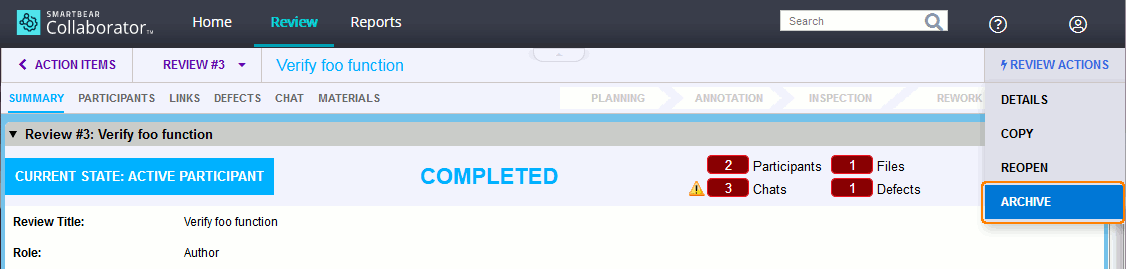
This will invoke a standard Save As dialog where you can specify the location for the archive.
Creating Archives Automatically
You may use Collaborator server triggers to archive reviews automatically. The general idea is to install the Command-Line Client on a server machine and call the ccollab admin archive command via the server's phase change trigger. Below are the detailed steps of how to achieve this:
| 1. | Install the Collaborator client on the same machine where Collaborator server is installed. |
| 2. | Specify the connection parameters for the client. |
| 3. | Create a directory to store the archived reviews. In this example that will be c:\archived-reviews on Windows platforms and /archived-reviews on Unix platforms. |
| 4. | Login to the Collaborator web interface as an administrator. |
| 5. | Go to the Admin->Triggers page |
| 6. | Find the "Review Phase Changed" trigger, and configure it as follows: |
Windows platforms |
Unix platforms |
Executable: c:\program files\collaborator client\ccollab.exe Parameters: admin archive ${review.id} --zip-path c:\archived-reviews |
Executable: /usr/local/ccollab_client/ccollab Parameters: admin archive ${review.id} --zip-path /archived-reviews |
You nay need to change paths to the Collaborator command line client and to the archives folder as necessary.
Note: In the example above the trigger does not check if the phase has transitioned to completed, cancelled or rejected. Since the ccollab admin archive command ignores in-progress reviews (by default) you can simply call it on every phase changed event. If your team is using the tool heavily, then you should create a shell script or batch file, and check the review phase before calling the ccollab admin archive command. This will result in improved performance, but is not really necessary for small or medium sized installations.
The Archive Contents
For each review a separate archive is created. Generated files have the names in the format "review-ID-archive.zip", where ID stands for the identifier of the review.
Each archive contains the following information about the review:
| • | The ReviewDetails.pdf file contains a PDF version of the Review Detail Report. |
| • | The material_conversations subfolder contains all comments, defects and conversations that were made during the review. For each of the commented files a separate PDF version is created that holds the contents of the file and the comments and defects related to this file. |
| • | Review materials. |
| ▪ | If the archive was created from Web UI, it contains all revisions of the materials that were uploaded to the review. If a file was uploaded multiple times (as it typically happens during rework), the archive will contain a copy of each file revision. |
| ▪ | If the archive was created with the ccollab admin archive command, the amount of review materials is specified by the --zip-option parameter. |
The naming structure of subfolders that store review materials, depends on how the materials were uploaded. For changes uploaded via version control system, the folder name will contain the name of SCM, the name of the repository and (if available) the ID of the changeset ("git-git.example.com_foo_repo.git-85d2f5ccb7f27e1628c09e4d1373f"). For uploads of arbitrary files, the folder names will contain the "upload-file-" portion followed by the date and time ("upload-file-2015-08-18-02-58-59").
| • | The "Allow Archive to zip" setting controls who can use this feature. The possible values are: administrators, group administrators, or all users (considering the access permissions of the chosen review). |
| • | By default, only the reviews in the Completed, Cancelled or Rejected phases can be archived. Yet, the "Allow Archive to Zip for Open Reviews" setting may allow to archive reviews on any phase. |
| • | The built-in PDF viewer of Windows 8, 8.1 and 10 do not support overlay layers in PDF files. Collaborator uses such layers to render coordinate comments (pushpins) in PDF versions of review materials for archived reviews. Because of this, pushpins will not be displayed if the PDF file from the archive is opened in the built-in PDF viewer of Windows 8, 8.1 and 10. As a workaround, please install the Adobe Acrobat Reader or any other full-featured PDF viewer. |