A "Role" in Collaborator indicates the way in which a person participates in a review.
Note: This feature is only supported in Collaborator Enterprise. For a complete list of differences between Collaborator editions, please see the comparison page.
Roles
Collaborator supports four "roles" for review participants. The following roles are configured by default but administrators can configure completely different templates.
Author
Authors are the people responsible for the changes or documents under review. Usually they are responding to comments and questions made by reviewers and observers. In the "Fix Defects" phase the review will be "in their court" and on their Action Items list.
Reviewer
Reviewers are responsible for inspection, creating defects, and so on. With multiple reviewers, they will hopefully come to a consensus about each questionable item, but this is not required by the system. Reviewers typically create defects, but again this is not required.
Observer
Observers are involved and make comments but they are not "vital" to the review. If all other participants mark the review "complete," the review goes to the next phase regardless of observer state. Observer roles are usually used when you want to bring in someone who has special expertise on an issue.
Moderator (optional, not enabled by default)
The Moderator maintains the pace and tenor of the review. This is an optional role that does not exist in the default installation. This is used for more formal review workflows where one person leads and controls the review.
Different styles of review require different roles with different terminology and rules for what each rule is allowed to see and do in a review. Formal reviews might have four roles with strict rules, informal reviews might have just an author and reviewer, and a "self-check" review might just require an author with optional external reviewer.
Users interact with roles when they are creating a new review or editing the list of participants in a review.
The Role Configuration screen lets you set up any number of sets of roles. Each set is given a name and corresponds to some concept of a review.

Any number of role configurations can be specified. The names here are never shown to an end user; they are used only when selecting a role configuration as part of a review workflow.
In each role configuration you can have between 1 and 4 roles.
User can copy all settings of the existing role configuration by clicking on the Clone link. Default title of the cloned role template is "CLONED - ${origin_role_template_name}".
A variety of options are available when editing an existing role configuration or creating a new one:
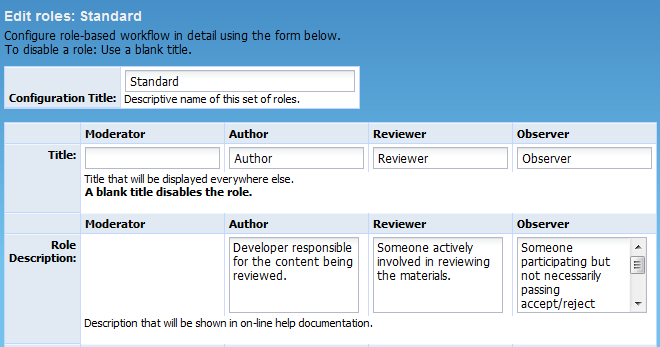
Configuration Title |
The title of this configuration. This is strictly an administrative thing -- users of the system will never see this title. They see review workflows instead. |
The name of the role as it will appear in drop-down lists and on-line help text. The user will use this title as the primary mechanism for referring to the role. Use a blank title to indicate that this role should be completely disabled. The "Author" role must always be in the second column, although it can be renamed. It must always exist. The concept of the "author" is a special one in the system because the author always has special responsibilities. For example, when a review is in "Rework" phase the author's Action Items list will say "Rework defects found" whereas other participants will see "(No Action Required) Waiting for author to rework defects". |
|
A description of the role that will be prominently displayed to the user in all client user interfaces where roles are chosen, most prominently in the Participants section of the Create Review wizard. |

If "None", this role will be allowed to create defects, but will not be allowed to mark their own defects fixed, reject their own defects, edit their own defects, or delete their own defects. If set to "Edit", this role will be able to create defects and edit their own defects, but will not be allowed to mark their own defects fixed, reject their own defects or delete their own defects. If set to "Fix, Reject and Edit", this role will be able to create defects, mark their own defects fixed, reject their own defects and edit their own defects, but will not be allowed to delete their own defects. If set to "Fix, Reject, Edit, and Delete", this role will be able to create defects, mark their own defects fixed, reject their own defects, edit their own defects, and delete their own defects Administrators can always change or delete any defect, regardless of this setting. In all but the most informal of reviews, authors are typically not allowed to mark defects fixed, but all other roles are allowed. This setting also applies to the ability to externalize a defect. |
|
If "None", this role will not be allowed to mark other users' defects fixed, reject other users' defects, edit other users' defects, or delete other users' defects. If set to "Fix and Reject", this role will be able to mark other users' defects fixed or reject but will not be able to edit or delete other users' defects. If set to "Edit", this role will be able to edit other users' defects, but will not be allowed to mark other users' defects fixed, reject other users' defects or delete other users' defects. If set to "Fix, Reject and Edit", this role will be able to mark other users' defects as fixed, reject other users' defects and edit other users' defects but will not be allowed to delete other users' defects. If set to "Fix, Reject, Edit, and Delete", this role will be able to mark other users' defects fixed, reject other users' defects, edit other users' defects, and delete other users' defects Administrators can always change or delete any defect, regardless of this setting. To enable this setting, the Restrict Access to Fix Defect setting must be set to "No". This setting also applies to the ability to externalize a defect. |

If true, users with this role will be presented with a button in the Next Steps screen that allows the user to say to the group: "I am finished looking at this review". The user will be brought back into the review if another user makes a non-trivial comment. If false, the user is told "You must wait for other users". Typically everyone except the author has this feature enabled. The author is usually not in control of when the review finished so his "I am finished" decision is not interesting. |
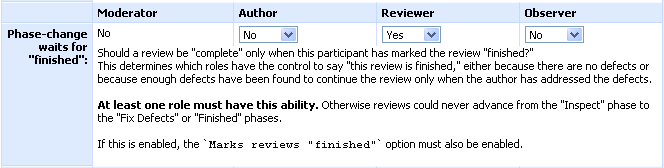
Specifies if a review phase change requires that participants with this role complete reviewing. This applies to the “Inspection -> Rework” and “Inspection -> Completed” changes. If this parameter is Yes and some of participants with this role have not yet approved the review, Collaborator will not change the phase. Typically, you enable this parameter for Reviewers and disable for Observers. This parameter has effect only if Marks reviews "finished" is also enabled. |

Please note that "Marks reviews finished" and "Phase-change waits for finished" must both be set to "yes" in order for this setting to be evaluated for the selected roles. Changes here will have no effect if one or both of those settings are set to "no" for the specified role. If yes, participants in this role will be required to mark comments read before finishing the review. Typically participants collaborate and discuss potential issues, so they are required to read each other's comments. However, some workflows have each participant work independently. Setting this configuration to "no" is usually applied to observer-type roles because they are frequently called in for something specific and do not need to "hang around" and see what other users have to say. This is also helpful in workflows where the reviewers independently submit comments to the author, who is then in charge of all changes without having to communicate back to reviewers. Note that this setting does not prevent anyone from coming back to the review and continuing to actively participate at any time. |
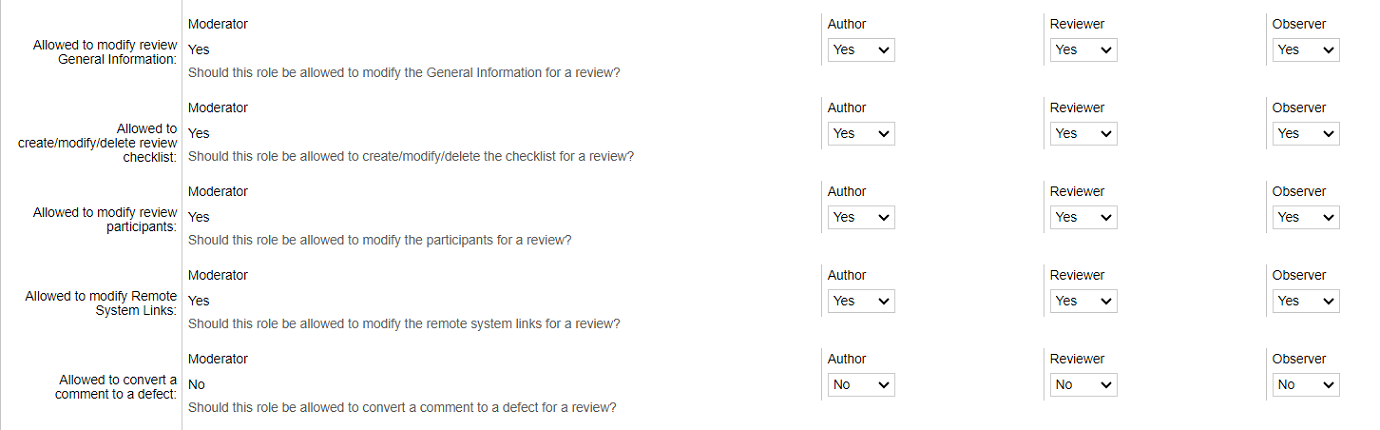
Should this role be allowed to modify the review title, template, custom fields and other data of the General Information section? Typically there is no harm in allowing this, but you might want to lock down exactly who has the last word on the review custom fields and title. |
|
Should this role be allowed to modify the checklist for a review? |
|
Should this role be allowed to modify the participants for a review? |
|
Should this role be allowed to modify the remote system links? |
|
Should this role be allowed to convert a comment to a defect for a review? |

Should this role be required to either sign off on or decline to sign off on a completed review? This setting takes effect when template based electronic signatures are enabled in the General Settings screen. |
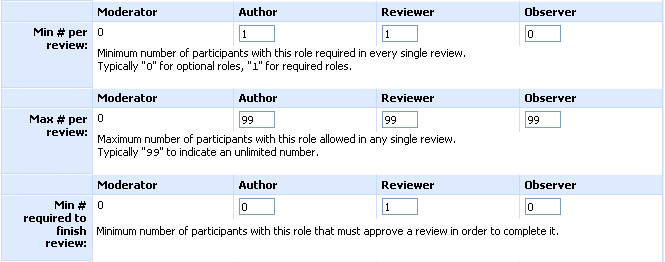
The minimum number of users with this role required in the review. Can be zero to indicate "This role completely optional". Most often used with reviewers or moderators to require at least one, or with a "very careful" review where multiple reviewers are required. |
|
The maximum number of users with this role required in the review. The maximum supported number per role is 999. Usually there is no reason to limit the number of users who can participate as a role in a review, except for highly formal reviews where a strict process is required. |
|
The minimum number of users with this role required to approve the review in order to complete it. This value should be less than or equal to a value specified in "Min # per review" for the respective role. If the user role allows to mark the review as finished and this value is 0, then all users with this role must approve the review to "close" it. If the user role is not obligated to approve reviews and this value is 0, then all users with this role are not required to "close" a review. |