Collaborator creates links in text that is typed by users as review comments, custom fields, and so on. Several types of links are created automatically:
| • | URL's create links to that URL |
| • | Names of files in the review create links that open that file in the Diff Viewer |
| • | Line numbers (for example, 'line 345') in a file comment create links to that line in the Diff Viewer |
Note: This feature is only supported in Collaborator Enterprise. For a complete list of differences between Collaborator editions, please see the comparison page.
You can define your own Automatic Links to integrate Collaborator with external systems. Each Automatic Link consists of a regular expression pattern, URL format, and optionally a tooltip. When a match is found, Collaborator creates a hyperlink around the matching text. The URL of the hyperlink and the tooltip are constructed by replacing references to groups with the text selected by the corresponding capturing groups in the regular expression.
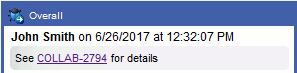
Examples of external systems you might want to link to include issue/bug trackers, build tools, or documentation library systems.
To create a new Automatic Link, click the New Automatic Link button. 
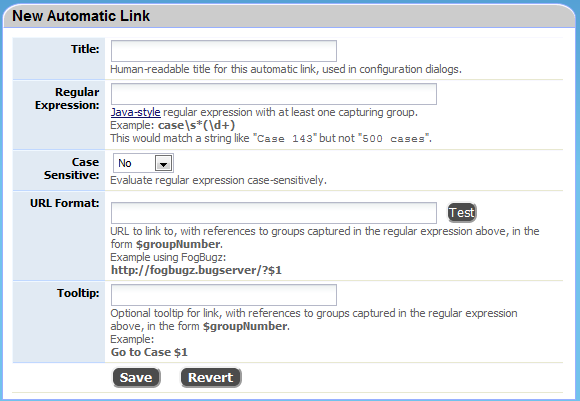
Human-readable title for this automatic link, only used in the Automatic Link Configuration page. |
|
A Java-style regular expression that identifies a reference to the external tool in text. This regular expression will be used to find matches in user-entered text in review titles, custom fields, comments, and defects. You must include at least one one grouping expression (parenthesis). This is combined with the URL Format to link to construct the hyperlink to the external tool. For example: case\s*(\d+) This would match a string like Case 1423 but not 500 cases. This is the standard way to refer to a bug in FogBugz. |
|
Evaluate regular expression case-sensitively. Usually this is set to "no". |
|
URL to link to, with references to groups captured in the regular expression above, in the form $groupNumber. Example using FogBugz: http://fogbugz.bugserver/?$1 |
|
Optional tooltip for link, with references to groups captured in the regular expression above, in the form $groupNumber. Example: Go to Case $1 |