Action Items are relevant, current things that you are included in. You can view your list of action items by clicking either Action Items or Home toolbar buttons:

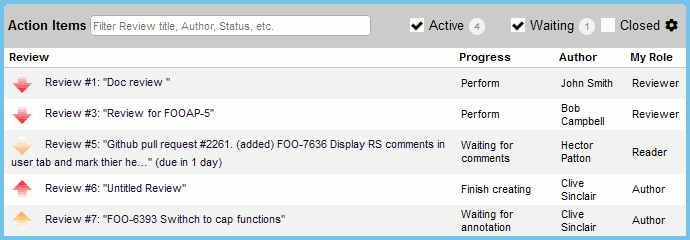
You can select which action items are shown, by selecting the check-boxes for "Active", "Waiting" and/or "Closed". Selecting "Active" displays all reviews that require your immediate action to proceed. Selecting "Waiting" displays all reviews awaiting for rework, comments, signature or other participants. Selecting "Closed" will list reviews that have recently been completed, cancelled or rejected.
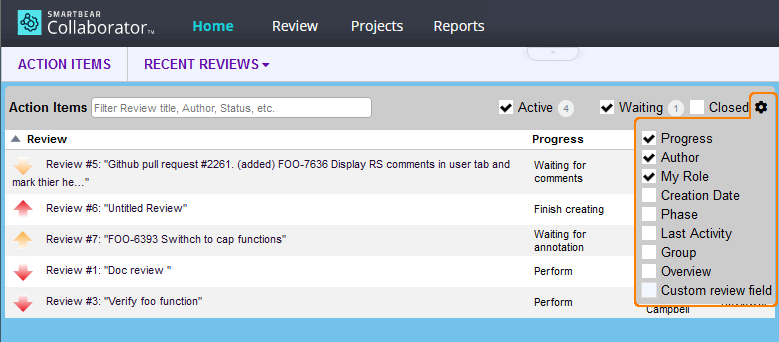
You can configure what information will be displayed in the Action Items table. You can add or hide standard review fields as well as custom review fields. To do this, hover the  button and select the desired review fields in the drop-down list.
To filter some particular items, just specify the sought-for text in the filter box. This will display only the items that contain the specified text in the listed fields.
Additionally, you can sort action items by clicking on the column headers: "Review", "Progress", "Author", "My Role" and so on.
Note: Action Items cannot display more than 1000 reviews.
Your Action Item list refreshes automatically every five minutes. You can refresh this screen manually, as well.
When you have an Action Item directing you to commit files, you remove it by clicking the review link on the left. Collaborator uses these Action Items to track whether review materials have been submitted to version control. If Collaborator does not have enough information to determine that the materials are already versioned it will create a reminder for you when the review is completed.
For recently completed reviews the Action Items list displays the "Dismiss" link to confirm that the review has been finished and dismiss it from the list of your active reviews.
Action Items are also visible in other clients: in Tray Notifier, in Eclipse Plug-in, in Visual Studio Extension and some others.
Progress values for action items:
Annotate Review |
Action |
you have been invited by the author to annotate the review |
Commit files |
Action |
you need to commit your files to source control |
Finish Creating |
Action |
you need to finish creating the review |
Fix Configuration |
Action |
not review related - you need to finish filling out your user configuration information |
Perform |
Action |
you need to perform the review |
Respond to Comments |
Action |
you need to respond to comments in the review |
Review cancelled |
Non-Action |
the review has been cancelled |
Review completed |
Non-Action |
the review has been completed |
Review rejected |
Non-Action |
the review has been rejected |
Rework defects |
Action |
you need to rework the defects in the review |
Sign review |
Action |
you need to sign the review |
Waiting for annotation |
Non-Action |
you are waiting for others to annotate the review |
Waiting for comments |
Non-Action |
you are waiting for others to make comments on the review |
Waiting for defect rework |
Non-Action |
you are waiting for open defects in the review to be reworked |
Waiting for other reviewers |
Non-Action |
you are waiting for others to complete the review |
Waiting for signatures |
Non-Action |
you are waiting for others to sign the review |