Using settings on the Notification Templates page, you can customize the content of e-mail and in-app notifications that Collaborator sends to review participants (see Notifications on Review Changes).
Note: This feature is only supported in Collaborator Enterprise. For a complete list of differences between Collaborator editions, please see the comparison page.
At the top of the page, there is a drop-down list of available notifications:
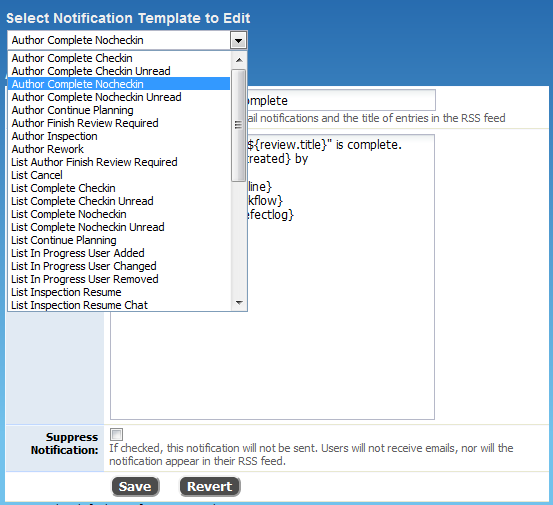
You can find detailed description of events below in this topic.
To modify a notification template
| 1. | Select the desired notification from the drop-down list. |
| 2. | Specify the e-mail subject in the Title Template box. |
| 3. | Enter the desired e-mail text into the Message Template box. |
| 4. | Click Save to apply the changes. |
Notes: |
1. The text in the “Title Template” and “Message Template” boxes can include Collaborator variables (like ${review.id} or ${review.creator.name}). These variables let you insert user- and review-specific information into notifications. For complete list of available values, see Variables. 2. Any links to Collaborator server from the notifications, use server's URL as specified by the External URL setting. |
To enable or disable a notification
| 1. | Select the desired notification from the drop-down list. |
| 2. | Select the Suppress Notification check box to disable the notification. Clear this check box to enable the notification. |
To return to default settings
| • | Simply click Restore Default Templates on the page. |
How to Determine Notification Recipients Quickly
To indicate notification recipients, Collaborator puts the following keywords at the beginning of notification name:
Recipient |
Description |
Author |
The author of the review, for which the event is generated. The author is also called "review creator". |
User |
All participants of the review. |
List |
All participants of the review and also the e-mail address (or mailing list) specified by the Notification List setting of Collaborator. Using these notifications are convenient for notifying multiple users, including those users who are not mentioned in the Participants list of a review. |
Reviewer |
All users with a Reviewer role on the review. |
Poke |
The user, who is poked (that is, notified explicitly). |
The drop-down list at the top of the setting page displays notifications in alphabetical order. Below is a list of notifications organized by their type.
Below is a description of notifications that Collaborator sends when a review phase changes:
The following notifications indicate that the review is in the Annotating phase:
Notification |
Sent To |
Remarks |
|---|---|---|
List Annotating |
All review participants and recipients of the Notification List e-mails |
Just a notification that the review is in the Annotating phase. |
User Annotating |
All review participants |
A notification that the review is in the Annotating phase. The default message template also describes the recipient’s role in the review. |
The following notifications indicate that the review has been canceled:
Notification |
Sent To |
|---|---|
List Cancel |
All review participants and recipients of the Notification List e-mails |
User Cancel |
All review participants |
The default notification message mentions the user, who canceled the review.
The following notifications indicate that all the reviewers have marked the review as completed, and that the author needs to mark it as completed as well in order for the review to be finished:
Notification |
Sent To |
|---|---|
Author Finish Review Required |
Review author |
List Author Finish Review Required |
All review participants and recipients of the Notification List e-mails |
Note: Configurations on the Admin | Roles page have the Marks reviews "finished" setting. It specifies, to which roles the above-mentioned notifications are applicable. If this setting does not specify that some role can mark reviews as "finished", Collaborator does not send notifications to the participants that have this role.
The following notifications indicate that the review has been completed:
Notification |
Sent To |
Remarks |
|---|---|---|
Author Complete Checkin |
Review author |
Indicates that the review has been completed, and the author can commit the changes to the source control. |
Author Complete Checkin Unread |
Review author |
Indicates that the review has been completed, but has unread comments. The author can commit the changes to the source control, but should read the comments before doing this. |
Author Complete Nocheckin |
Review author |
Indicates that the review has been completed. |
Author Complete Nocheckin Unread |
Review author |
Indicates that the review has been completed and that there are unread comments in it. |
List Complete Checkin |
All review participants and recipients of the Notification List e-mails |
Indicates that the review has been completed, and the author can commit the changes to the source control. |
List Complete Checkin Unread |
All review participants and recipients of the Notification List e-mails |
Indicates that the review has been completed, but has unread comments. The author can commit the changes to the source control, but should read the comments before doing this. |
List Complete Nocheckin |
All review participants and recipients of the Notification List e-mails |
Indicates that the review has been completed. |
List Complete Nocheckin Unread |
All review participants and recipients of the Notification List e-mails |
Indicates that the review has been completed and that there are unread comments in it. |
User Complete |
All review participants |
A notification that the review has been completed. |
User Complete Unread |
All review participants |
A notification that the review has been completed and that there are some unread comments in it. |
Note: the list above contains the Checkin and Nocheckin notifications that are very similar to each other. The notification message, which Collaborator sends, depends on the "Create a Commit Action Item for Completed Review" setting (you can find it on the Admin | General setting page). If the setting's value is Create, then Collaborator sends the "Checkin" notifications. Otherwise, it sends the "Nocheckin" notifications.
The following notifications indicate that the review is in the Inspection phase.
Notification |
Sent To |
Remarks |
|---|---|---|
Author Inspection |
Review author |
Indicates that the review has got to the Inspection phase and that the author can respond to comments. |
List Inspection Resume |
All review participants and recipients of the Notification List e-mails |
Indicates that the review returned back to the Inspection phase and that participants can review the author's proposed fixes. |
List Inspection Resume Chat |
All review participants and recipients of the Notification List e-mails |
Indicates that the review returned back to the Inspection phase and that it has comments that participants need to read. |
List Inspection Start |
All review participants and recipients of the Notification List e-mails |
Indicates that the review has got to the Inspection phase for the first time. |
User Inspection Resume |
All review participants |
Indicates that the review returned back to the Inspection phase and that participants can review the author's proposed fixes. |
User Inspection Resume Chat |
All review participants |
Indicates that the review returned back to the Inspection phase and that it has comments that participants need to read. |
User Inspection Start |
All review participants |
Indicates that the review has got to the Inspection phase for the first time. |
The following notifications indicate that the review returned back to the Planning phase. The author needs to finish planning in order for inspection to be able to continue.
Notification |
Sent To |
|---|---|
Author Continue Planning |
Review author |
List Continue Planning |
All review participants and recipients of the Notification List e-mails |
The following notifications indicate that the review has been rejected. The default notification message says what user rejected the review.
Notification |
Sent To |
|---|---|
List Reject |
All review participants and recipients of the Notification List e-mails |
User Reject |
All review participants |
The following notifications indicate that the review is in the Rework phase. The author needs to rework found defects:
Notification |
Sent To |
|---|---|
Author Rework |
Review author |
List Rework |
All review participants and recipients of the Notification List e-mails |
User Rework |
All review participants |
Collaborator sends these notifications to indicate that reviewers need to sign the review.
Notification |
Sent To |
Remarks |
|---|---|---|
Author Review Signed |
Review author |
Indicates that the author has signed the review. |
Author Review Signed Checkin |
Review author |
Indicates that the author has signed the review. |
Note: The two notifications above are similar to each other. The notification message, which Collaborator sends, depends on the "Create a Commit Action Item for Completed Review" setting (you can find it on the Admin | General setting page). If the setting's value is Create, then Collaborator sends the "Checkin" notification. Otherwise, it sends the other notification. |
||
List Complete Waiting for Signature |
All review participants and recipients of the Notification List e-mails |
Indicates that the review needs to be signed for approval. |
List Signature Declined |
All review participants and recipients of the Notification List e-mails |
Indicates that some participant has declined to sign the review. |
User Complete Signature |
All review participants |
The review has been completed and needs to be signed by participants. |
The following notifications indicate that the review is stalled and needs some activity:
Notification |
Sent To |
Remarks |
|---|---|---|
List Review Stalled Author Not Reworking |
All review participants and recipients of the Notification List e-mails |
Indicates that the review is stalled because the author needs to fix some defects. |
List Review Stalled Reviewer Not Finished |
All review participants and recipients of the Notification List e-mails |
Indicates that the review is stalled because a reviewer needs to approve it. |
Review Stalled Author Finish Annotating |
Review author |
Indicates that the review is stalled in the Annotating phase. It is waiting for the author to begin the Inspection phase. |
Review Stalled Author Not Reworking |
Review author |
Indicates that the review is stalled in the Reworking phase, and that the author should fix defects. |
Review Stalled Reviewer Not Finished |
Participants responsible for completing the review. |
Indicates that the review is stalled in the Inspection phase. The default message specifies the participant (normally a reviewer) who needs to approve the review in order for it to be completed. |
User Waiting Failed |
All review participants |
Indicates that the review is stalled because some review participants have already approved the review and others are waiting for each other. |
The following notifications indicate that the review is approaching its deadline and needs some activity:
Notification |
Sent To |
Remarks |
|---|---|---|
List Review Approaching Deadline Author Not Reworking |
All review participants and recipients of the Notification List e-mails |
Indicates that the review is approaching its deadline and the author needs to fix some defects. |
List Review Approaching Deadline Reviewer Not Finished |
All review participants and recipients of the Notification List e-mails |
Indicates that the review is approaching its deadline because a reviewer needs to approve it. |
Review Deadline Change |
All review participants and recipients of the Notification List e-mails |
Informs that the review's deadline has been changed. |
Review Approaching Deadline Author Finish Annotating |
Review author |
Indicates that the review is approaching its deadline but is still in the Annotating phase. The author needs to move it to the Inspection phase. |
Review Approaching Deadline Author Not Reworking |
Review author |
Indicates that the review is approaching deadline in the Reworking phase, and that the author should fix defects. |
Review Approaching Deadline Reviewer Not Finished |
Participants with the Reviewer role |
Indicates that the review is approaching deadline in the Reworking phase. The default message specifies the reviewer, who needs to approve the review in order for it to be completed. |
Changes in File and Participant Lists
Collaborator sends the following notifications when the review's properties change:
Notification |
Sent To |
Remarks |
|---|---|---|
List New Files |
All review participants and recipients of the Notification List e-mails |
Indicates that new files have been added to the review. |
List In Progress User Added |
All review participants and recipients of the Notification List e-mails |
Indicates that one or more users have been added to the review. The default notification message specified the users' roles in the review. |
List In Progress User Changed |
All review participants and recipients of the Notification List e-mails |
Indicates that the role of some review participant has changed. |
List in Progress User Removed |
All review participants and recipients of the Notification List e-mails |
Indicates that one or more users have been deleted from the review's Participants list. |
User New Files |
All review participants |
Indicates that new files have been added to the review. |
When a review is in the Inspection phase and there are unread comments, Collaborator sends the List Inspection Resume Chat and User Inspection Resume Chat notifications. See their descriptions above.
Notification |
Sent To |
Remarks |
|---|---|---|
Poke |
A review participant that you poked in the Collaborator UI |
Just a notification that the review needs the user's attention. |
List Calendar Invite |
All review participants and recipients of the Notification List e-mails |
A notification in iCalendar format to schedule a formal meeting on review. |
See Also