Collaborator stores the contents of files under review on the server. Over time, this cache will grow to be quite large, and will periodically need to be purged. When deleting a review, Collaborator deletes files that were uploaded for this review from the content storage as well (unless they are used in some other reviews).
The Archive section of the Admin interface allows you to check the current status of the content cache and to archive (or delete) files that have not been in use for a long time.
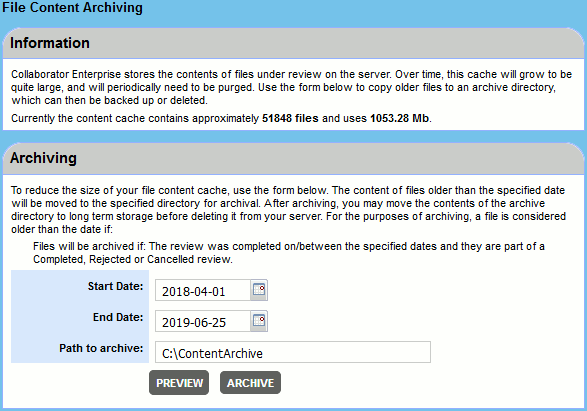
The Information panel provides estimates of the total number of files and their collective size. Keep in mind that these are approximate estimates, since a complete scan of content cache folder could take plenty time. To determine a precise size of content cache and the total number of files in it, use standard file system tools.
The Archiving panel allows to archive old files. A file is considered "old" if:
| • | A file belongs to a review that was completed within the specified date period and the review phase is completed, rejected or cancelled. |
-- OR --
| • | The file has never been part of a review (or was a part of a deleted review) and was uploaded within the specified date period. |
Files that belong to in-progress reviews (in planning, annotating, inspection or rework phases) are NOT archived.
When a file belongs both to in-progress and to closed reviews, it will be copied to created archive, but remain in content cache.
Archiving Files
Tip: Archiving could be a long lasting operation (depending on amount of files), therefore we recommend that you use this feature at night or during another time when Collaborator database is idle.
To archive old files:
| 1. | Specify the desired date period using the Start Date and End Date fields. |
| 2. | Specify where to store the archive in the Path to archive field. |
| 3. | Press Preview to determine how many files and how much data size will be moved off by the archive. |
| 4. | Press Archive to create the content cache archive. |
Once the files are archived, they can be preserved in long-term storage or deleted entirely.
On attempts to open any of the archived file, users would see a "Content for is not available - it was probably archived by your administrator." message.
Note: HSQL DB doesn’t support archiving of content cache.
Restoring Archived Files
To restore files after they have been archived, simply copy them back into the live directory.
The directory structure must be preserved.
The copy operation can be done while the server is running; users will not be disrupted.