About
Rich-text and Markdown formatting is currently supported for the following fields of Web Client:
| • | comments and defects in the Review Screen, |
| • | comments and defects in the Diff Viewer, |
| • | comments and defects in Reports. |
Other clients and exported reports display comments and defects using plain-text representation.
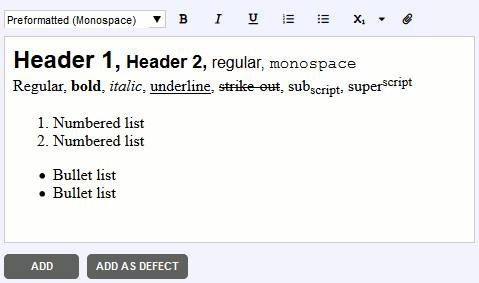
All text fields that support rich-text have a toolbar that allows specifying or changing formatting.
|
Assigns a pre-defined style to the current paragraph or to selected paragraphs. The following styles are available:
|
||||||||
|
Applies, or clears bold formatting. |
||||||||
|
Applies, or clears italic formatting. |
||||||||
|
Applies, or clears underlined formatting. |
||||||||
|
Applies, or clears numbered list formatting. |
||||||||
|
Applies, or clears bullet list formatting. |
||||||||
|
Applies, or clears subscript formatting. |
||||||||
|
Applies, or clears superscript formatting. |
||||||||
|
Applies, or clears strike-out formatting. |
||||||||
|
Icon to attach external files (e.g., screenshots, logs, etc.) to the comment |



Markdown uses special conventions to create formatted text from plain-text.
To apply Markdown formatting for new comments and defects, your Collaborator administrator should turn on the "Enable Markdown in comments" setting. Existing comments and defects will retain their current formatting.
Below is a list of Markdown elements supported by Collaborator.
Headers |
Start a line with a hash character # to apply header formatting. Up to six levels of headings are supported. # Header 1 ## Header 2 ### Header 3 #### Header 4 ##### Header 5 ###### Header 6 |
Bold |
Wrap the text with double asterisk * characters. **This is bold text** |
Italic |
Wrap the text with a single asterisk * character. *This is italic text* |
Inline code |
Wrap the text with a single backquote ` character. This is regular text `and this is inline code` |
Code block |
Prefix your code with four space characters. main( ) { printf("hello, world\n"); } |
Link |
Specify link text wrapped in square brackets [] and then specify link URL wrapped in round brackets (). [Our site](http://example.com) |
Bullet list |
Prefix each line with a single asterisk *, minus - or plus + character. * Bullet item 1 * Bullet item 2 |
Horizontal line |
Insert three asterisk *or dash - characters. *** --- |
To enter specific or literal characters ignoring Markdown formatting, prefix that character with a backslash \ character.
Technical details and limitations
| • | Message length is limited to 16000 characters (including html tags). Longer messages will be truncated (replaced with “… “); |
| • | Text from clipboard will be pasted as plain text. |