You can create new reviews on the basis of a previous review. This allows to retain some information from the previous review (list of participants, custom field values, review materials and so forth).
To copy a review:
| 1. | Open the review you want to copy in the Review Summary Screen. |
| 2. | Select Review Actions | Copy in review header: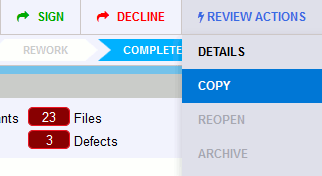 |
| 3. | In the ensuing pop-up dialog, specify title for the new review and select what information to copy from the previous review: Participants, Custom Fields, Participant Custom Fields, Materials, Remote System Links for Issue Tracking. Note: When copying remote system links for issue tracking Collaborator does not copy links to closed items. Also, this functionality acts independently from the template's Automatically Add Remote System Links settings which parse the review's title, custom fields, comments for links to remote systems and append them to the review's Remote System Links section. 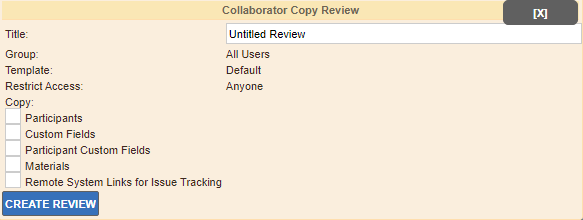 |
| 4. | Click Create Review. |
Once created, your existing subscriptions will apply to a new review. This may result in new participants be added to the review which were not part of the original review.
Alternatively, you can copy a previous review using command-line interface (ccollab admin review copy), using the JSON API (ReviewService.copy) or from the Review Summary Screen of Visual Studio Extension.