About
User mentioning is currently supported for the following fields of Web Client:
| • | comments and defects in the Review Screen, |
| • | comments and defects in the Diff Viewer, |
Other fields of Web Client and other clients do not send any notifications when mentioning users.
How it works
To mention a user just type the @ character followed by user login or display name. If the login contains space characters, enclose it in square brackets. For example: @[bob flemming].
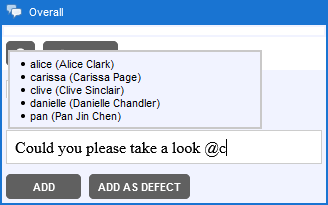
The editor will display a drop-down with user suggestions, which filters-out the available users as you type. You can also select the desired user using mouse or using Up, Down and Enter keys.
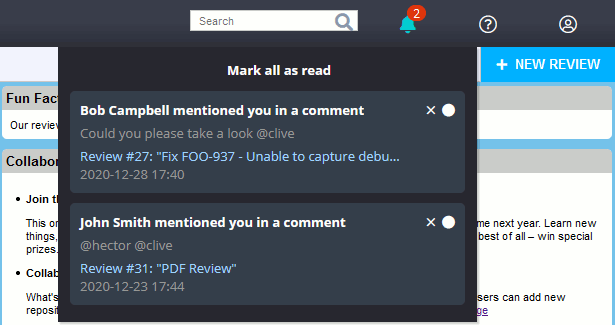
When you submit your comment or defect, Collaborator sends an e-mail and/or in-app notifications, so that mentioned users may check the corresponding comment or defect.
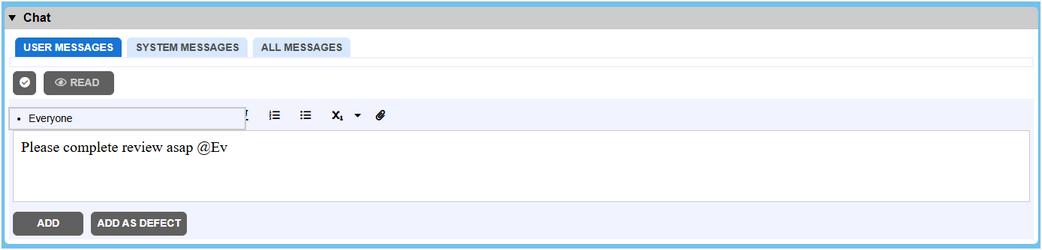
One can also mention all the users participating in the review at once by typing @Everyone .
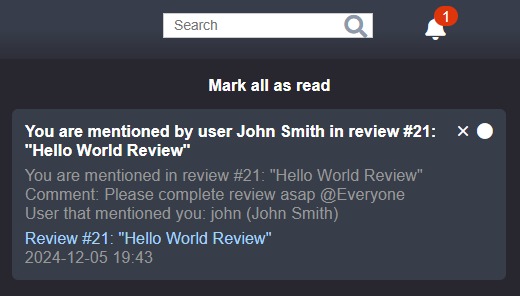
When everyone is mentioned in comment or defect, Collaborator sends an e-mail and/or in-app notifications, to all the review participants.
Technical details and limitations
| • | The list of suggested users contains only those users that are allowed to access the current review according to the Restrict access to review setting. |
| • | Users are identified by their login (as they are unique). User display names are listed to simplify search and improve readability. |
| • | User name and login search is case-insensitive. |
| • | The list of suggested users is refreshing with each input character. |
| • | The list of suggested users is limited by 20 first users that match the input. |
| • | User mentioning is only processed when a blank space character precedes the @ character. For example: test @username1. It is not processed when the @ character occurs within the string. For example: user1@mail.com |
| • | If the login contains space characters, enclose it in square brackets. For example: @[bob flemming]. |