Calendar notifications may be useful for scheduling formal meetings on a particular review. Anyone of review participants may create an iCalendar invitation from the Review Summary Screen (see below). Once created, all participants of that review will receive email messages with a meeting proposal on specific date and time.
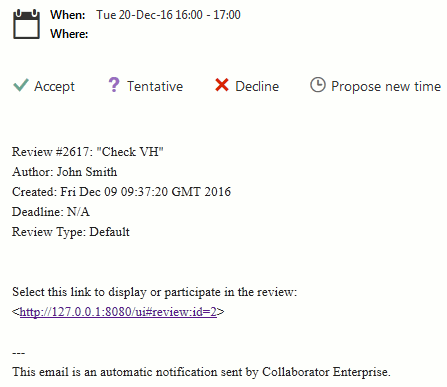
Calendar invitation in Outlook
Technical Details
Calendar invitations are sent via email. Therefore, your Collaborator administrator should configure SMTP server settings and enable email notifications.
Calendar invitations use iCalendar format. To process them correctly, your email client should support this format. Otherwise, invitation will be interpreted as ordinary file attachment.
By default, the user who has created the invitation is assigned as the organizer of the meeting. This behaviour can be changed by the Use iCal organizer setting.
The text content of Calendar notifications is defined in the List Calendar Invite notification template.
Creating Calendar Invitations
To create Calendar notifications:
| 1. | Open desired review in the Review Summary Screen, |
| 2. | Scroll to the Participants section,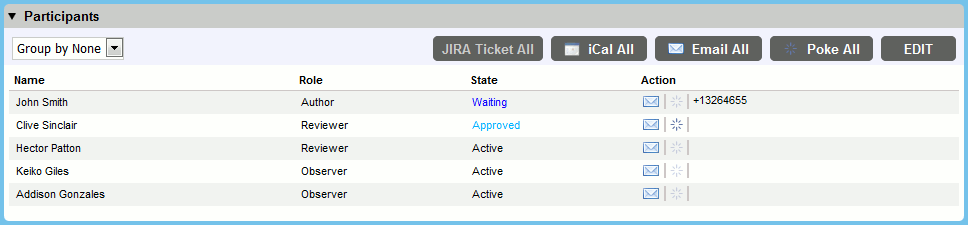 |
| 3. | Click the "iCal All" button in the section's upper-left corner, |
| 4. | In the ensuing Collaborator iCal Invite dialog: Specify date and time of event, (optionally) specify location, modify event description, add other participants and click Send. 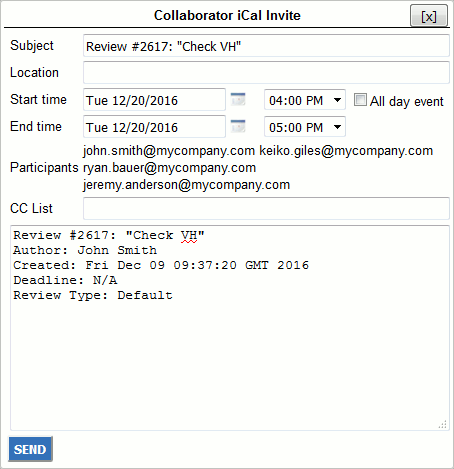 |