Collaborator Visual Studio extension adds a new window to Visual Studio IDE. The Collaborator View window shows current user name and server URL and lists the incoming and outgoing reviews on the specified Collaborator server. This window is analogous to the Home page with the Action Items list of Web Client.
To display the window, select Collaborator | Show Tool Window from the main menu of Visual Studio.
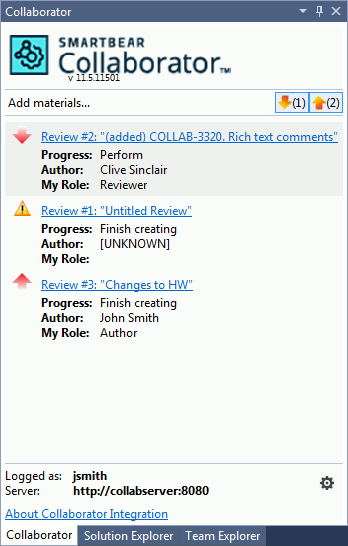
From the Collaborator View window you can --
Create new reviews or upload materials to existing reviews
Click "Add materials" from the Collaborator View's toolbar. For detailed information, see Creating Reviews.
Open existing reviews
Click a review in the list and explore its details in the subsequent Review Summary Screen.
Configure extension settings
Click the extension version number in the header, or the gear icon in footer. This will open the Options dialog with the extension settings.