Important: This topic describes how Collaborator integrates with Rational Team Concert and Eclipse. In order for the described integration features work, you need to configure the Rational Team Concert and Collaborator servers and clients properly. See Configuring Servers, Clients and Plug-Ins.
Creating Reviews Automatically
Collaborator's plug-in for Rational Team Concert tracks the changes of a work item state. If you change the state of a work item, the plug-in creates a review for that work item in Collaborator and attaches the changelist to this review. The plug-in also creates a review, if you add a changelist to a work item that has no changelist associated with it.
If a review was created in this way, Collaborator will track changes in the work item's Approvals list and update the review's Participants list appropriately. Also, you will see the status of a user work on the review in the State column of the Approvals list.
Note: The plug-in does not update a review if you update an existing changelist.
Requirements:
| • | To use automatic review creation, you need to -- |
| ▪ | Configure the Collaborator server. |
| ▪ | Set up follow-up actions in Rational Team Concert. |
| • | To take advantage of user list and state synchronization, you also need to configure the Collaborator server. |
Creating Reviews From Eclipse Manually
Collaborator's Eclipse plug-in inserts new Add To Review items to the context menus of these views:
| 1. | Pending changes view |
| 2. | History view |
3. Work Items view
Right-click any item (for example, a changelist) on these views and select an Add to Review menu item. Follow instructions of the subsequent wizard to create a new review or add the changelist to an existing review.
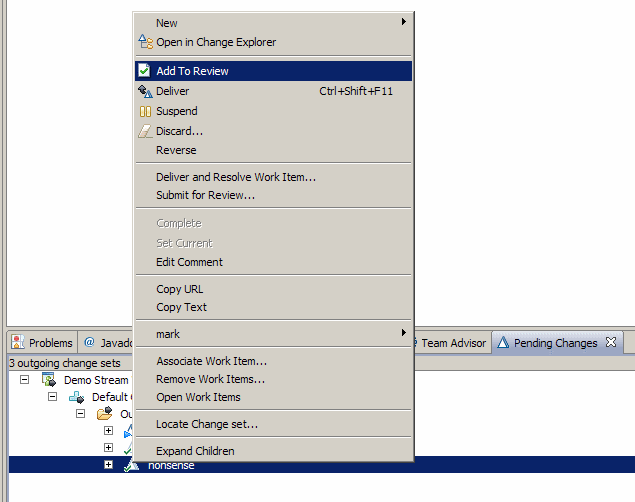
Creating a review from a changeset
On Work Items view, an Add to Review with Children menu item will also appear. When you use this function, the Collaborator will try to fetch changelist from selected Work Item and its children.
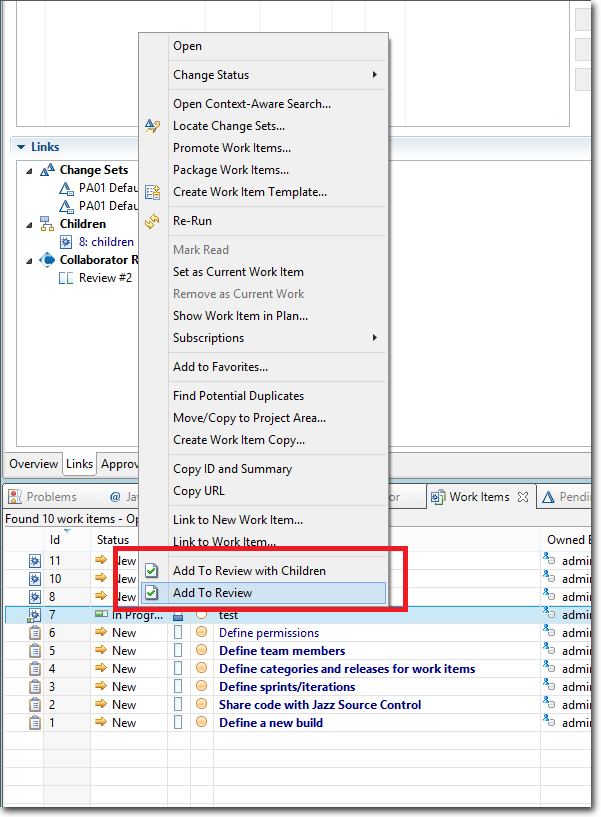
Creating a review from the Work Items context menu
Additionally, you can use an Add to Review function from the Links tab of the Work Items view.
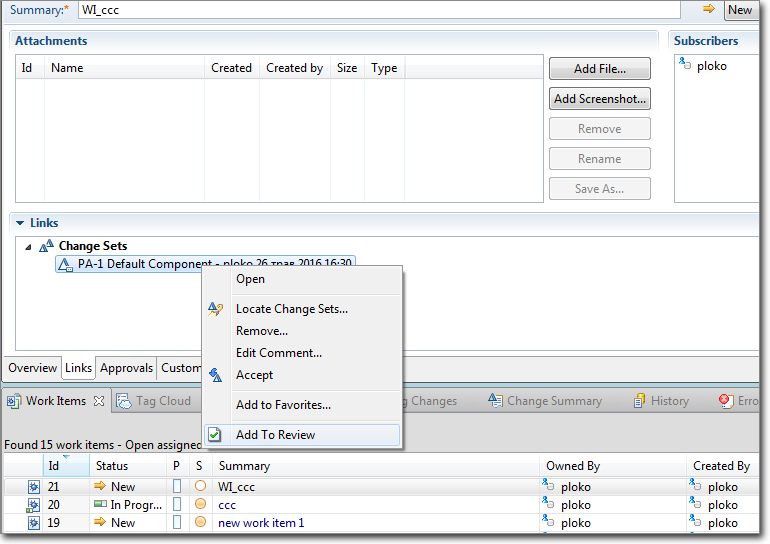
Creating a review from the Links context menu
Note: You have to save the work item state before trying to add changelists to review.
Requirements: to use this feature, you need to --
| • | Configure the Collaborator server. |
| • | Have Rational Team Concert plug-ins installed into your Eclipse IDE. |
| • | Install the Collaborator plug-in for Eclipse. |
Creating Reviews From Visual Studio Manually
You need to configure Collaborator's Visual Studio Extension and select your RTC configuration as the default SCM configuration. After that you can call the extension's Add to Review Wizard and create reviews reviews based on RTC changesets and work items.
| • | To create reviews for a specific RTC changesets: Select "Add RTC changesets", choose the desired workspace and component, click Find and then select the desired changesets.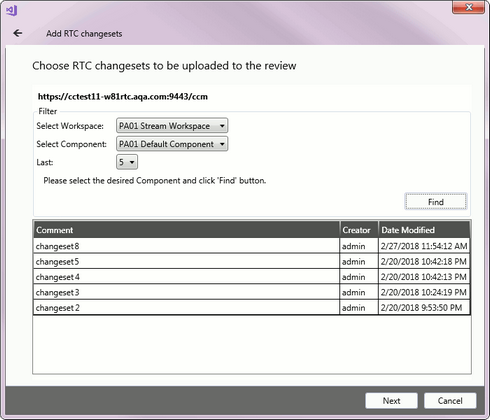 |
| • | To create reviews for changesets linked to a specific RTC work item: Select "Add RTC work item changesets", choose the project area and perform one of the listed queries, click Find and then select the desired work item.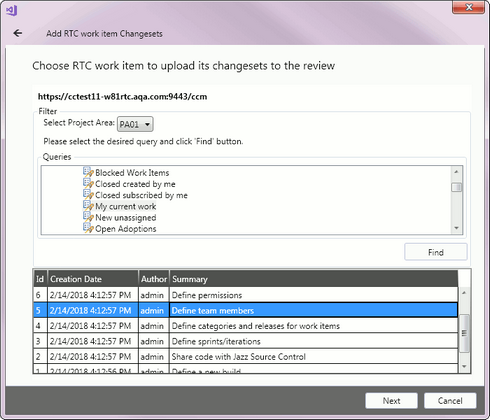 |
Requirements: to use this feature, you need to --
| ▪ | Configure Collaborator server and client. |
Creating Reviews From Command-Line Client Manually
The Command-Line Client may need some configuration. Try testing your configuration to verify the configuration is detected correctly.
If the Command-Line Client is unable to detect your Rational Team Concert configuration or you want to override the detected settings, you can manually specify Rational Team Concert settings using global options.
To manually configure the Command-Line Client to use Rational Team Concert, execute the following command:
ccollab set scm rtc
Rational Team Concert-specific Options
In order to use Rational Team Concert integration from command-line client, you need to configure both Collaborator server and clients and RTC server. See configuration instructions.
Option |
Description |
|---|---|
--rtc-repository-uri <value> |
The URI of the repository to work with. |
--rtc-username <value> |
The user name to use for the chosen RTC repository. |
--rtc-password <value> |
The password of the user. |
Requirements: to use this feature, you need to --
| ▪ | Configure Collaborator server and client. |
Synchronizing the Approvals and Participants Lists
For reviews that were created automatically on the work item's state change, Collaborator synchronizes the contents of the work item's Approvals list and the review's Participant list:
| • | When you append a Reviewer entry (user) to the Approvals list, Collaborator includes the same user into the Participants list of the review as a Reviewer. This also works in the opposite way: if you add users to participants, they are also added to approvers. |
| • | Synchronization also works for deletion: if you remove a user from participants in Collaborator, the plug-in will remove that user from the Approvals list of your work item. Note, however, that the opposite deletion operation is not available at the moment, that is, if you delete a user from the Approvals list of a work item, Collaborator will not remove that user from the Participants list. |
Notes:
| • | In order for this feature to work, the user must have the same name in Collaborator and in Rational Team Concert. |
| • | When tracking changes made to the Approvals list, Collaborator tracks the addition of Reviewer entries only. If you add an entry of the Approver type, the review's Participants list will not be updated. |
| • | Collaborator updates the Approvals list after the review left the Planning phase and moved to the Annotating phase. Any participant that was added during the Planning phase will also be included into the work item once you move the review to the Annotating phase. |
| • | Collaborator synchronizes only those users, whose role allows them to finish the review. Participants that do not need to finish the review (for example, Observers) are not added to the work item's Approvals list. Similarly, if you remove such a user from the Participants list, they will not be deleted from the Approvals list. If you assign a participant a role that does not allow them to finish review (for example, change the role from Reviewer to Observer), Collaborator will delete this participant from the Approvals list. |
| • | Once again, synchronization works for those reviews that were created automatically. It does not work for the reviews that were created through the "Add To Review" menu command. |
If you do not want automatic updates of the user list, disable the Add reviewers and Remove reviewers settings of the Collaborator server. See Configuring Collaborator Server.
Requirements: to use this feature, you need to --
| • | Configure the Collaborator server. |
| • | Set up follow-up actions in Rational Team Concert. |
If a review was created automatically on the work item's state change, Collaborator tracks the changes made to the review phase. If a user completes the review, or cancels or rejects it, Collaborator updates the State attribute of that user in the Approvals list.
| • | If a user completed the review, the state is changed to Approved. |
| • | If a user cancels or rejects the review, the state is changed to Rejected. |
Requirements: to use this feature, you need to --
| • | Configure the Collaborator server. |
| • | Set up follow-up actions in Rational Team Concert. |
Watch the following video to see Collaborator's integration with Rational Team Concert:
https://support.smartbear.com/screencasts/collaborator/rational-team-concert-demo/
See Troubleshooting.