This category holds Collaborator license tab, which displays information about your current Collaborator license.
The licensing is done by the administrator on the Collaborator server. Collaborator client software doesn't have to be licensed.
Collaborator License
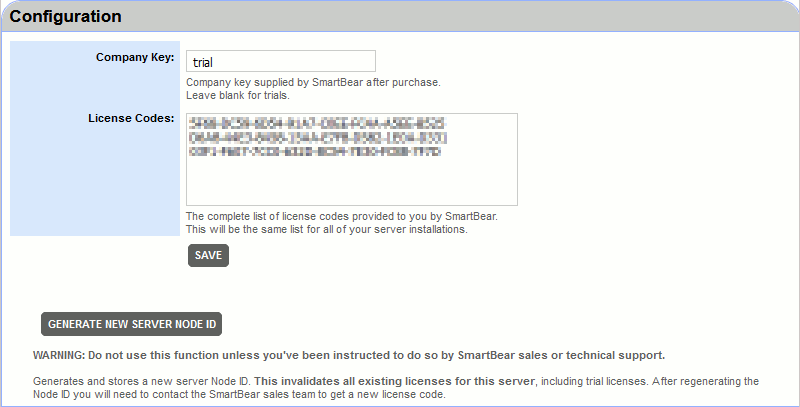
In Configuration section you can configure your Collaborator license. See this topic for instructions on how to configure your license. You should specify the following data:
The company key supplied by SmartBear after purchasing the license. The company key is "trial" for temporary licenses and a word or phrase for permanent ones. |
|
The list of 32-character license codes for the Collaborator server provided by SmartBear. |
If you have the license set up, you can use the Update from SmartBear button to request a license update directly from the SmartBear license server.
 In order for this feature to work, your computer must have a functioning Internet connection, and proxies and firewalls in your network should allow connection to the Collaborator license server (URL https://licensing.codecollaborator.com, port 443).
Once you are finished editing the license configuration, select Save to save changes.
Generate New Server Node ID
To generate a new server Node ID, you can use the Generate New Server Node ID button.
Do not use this function unless you've been instructed to do so by SmartBear sales or technical support. It invalidates all the existing licenses for the server, including trial licenses. After generating a new Node ID, you will need to contact the SmartBear sales team to get a new license code.
The Current License section displays information about your current Collaborator license.
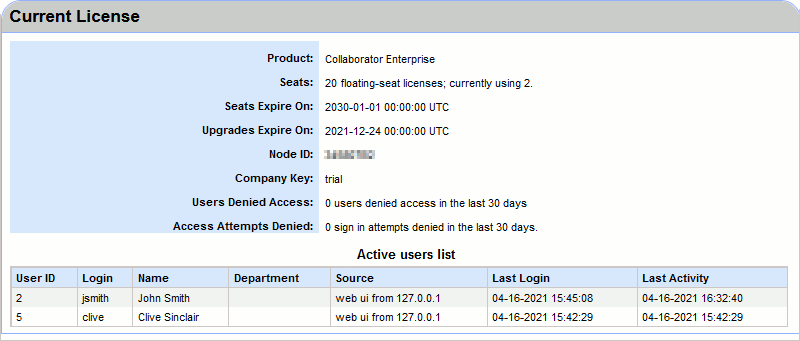
The Collaborator edition the license applies to. |
|
The number and type of seats available under the license and the number of seats currently consumed. SmartBear offers fixed-seat and floating-seat licenses for Collaborator. See Licensing for more information on the types of licenses and license consumption. |
|
The date and time when the license expires. |
|
The date and time when license upgrades expire. |
|
A unique identifier of your Collaborator server. All the licenses issued for the server are linked to the Node ID. The Node ID is bound to the database, and not the server hardware or operating system. As long as you are connecting to the same database, the Node ID will not change, and the license will remain valid. During server migration, the server's Node ID is carried over, and so are all the licenses linked to it. |
|
The company key supplied by SmartBear after purchasing the license. The company key is "trial" for temporary licenses and a word or phrase for permanent ones. |
|
The number of login attempts failed due to licensing reasons in the last 30 days. The number is not incremented if a login attempt fails due to the user having been disabled or entering incorrect login or password. |
Additionally, this section can display a list of active users. To display it, you need to enable the Show active users list in the license page setting.
Once enabled, it will display information about Collaborator users who are currently logged-in: their ID, username, source of license consumption, as well as date and time of last login and last activity.