The Tray Notifier is a cross-platform tray notifier client interface to the Collaborator server. It can be used to provide an easy way to see what reviews you are currently participating in, and prompt notification when a review requires your attention.
Starting the Tray Notifier
The Tray Notifier is an executable named ccollabtray. On Windows machines the graphical installer includes an option to automatically run the Tray Notifier on startup (a shortcut to ccollabtray is placed in the Windows Start Menu Startup folder). Non-Windows platforms have to manually start ccollabtray.

If you used the graphical installer, your connection to the Collaborator Server should be configured already. Otherwise, you will be prompted when you try to connect. You can also select the Preferences item in the context menu to open the preferences dialog. Use the Server Connection Preferences page to configure the connection information to your Collaborator Server.
Using the Tray Notifier
Clicking on the Tray Notifier opens a list of your current Action Items.
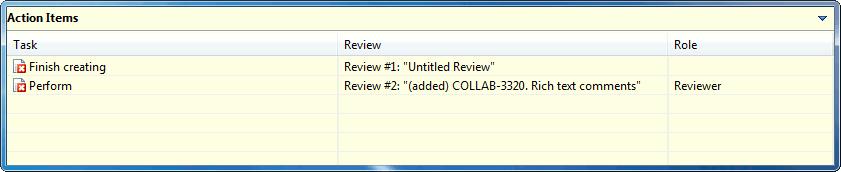
Tray Notifier Action Items
The Action Items list can be resized and moved by dragging it is borders. Action Items which are urgent appear with a red icon. Action Items which are not urgent appear with a green icon. Double-clicking on an Action Item opens a page in a browser window which lets you perform the action. Commit Action Items will open a wizard that will walk you through committing your files. Most changes can be committed with the tray notifier, but often changes to the directory structure will require that you use your SCM's tools directly.
The Tray Notifier icon changes to show a check-mark to alert you when there are new Action Items that require your attention.

The context menu of the Tray Notifier (right-click on Windows) includes several options:
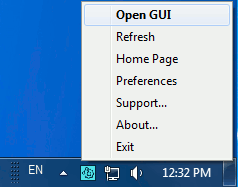
Tray Notifier context menu
| • | Open GUI launches GUI Client |
| • | Refresh immediately checks the Collaborator Server for updated Action Items |
| • | Home Page opens your Collaborator Home Page in a browser window |
| • | Preferences opens the client preferences dialog |
| • | About... tells you information about your installation |
| • | Exit shuts down the Tray Notifier |