The Collaborator server can be configured to communicate directly with your Perforce server. This allows users to review submitted changelists completely from the browser, without having to install any client programs. To enable this feature, first install and configure a Perforce client on the Collaborator server and then create an entry for your Perforce server in the Version Control tab of the administration interface. Version control server entries are also created automatically if one of the client programs uploads files from a server that does not match any of the currently configured servers.
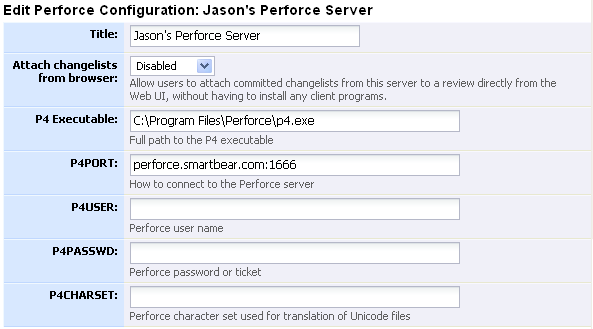
The title is displayed to users, so it should be something that everyone will understand, even if they are going through proxies, VPNs, or other such things. When a version control server entry is created automatically, this is filled in with the server address (p4port) of the server. |
|
If enabled, this feature lets users select submitted changelists to review directly from the web browser, without having to install any client programs. |
|
Full path to the P4 executable |
|
Address to use to connect to the server. When a version control server entry is created automatically, this is filled in with the server address obtained from the client. |
|
Perforce user name |
|
Perforce password or ticket |
|
Perforce character set used for translation of Unicode files |
The Collaborator server can be configured to check Perforce protections with the Perforce server whenever a user tries to access a file.
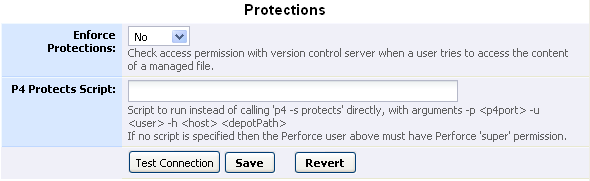
When enabled, Collaborator will check access permission with your Perforce server whenever a user tries to access the content of a file managed by this server. Note that this assumes that the user's Perforce username is the same as their Collaborator login.
To check Perforce protections the configured P4USER must have Perforce "super" permission. If you do not want to provide an account with that level of permission, you can instead configure a script for Collaborator to run instead of calling 'p4 -s protects' directly.
The script will be passed arguments "-p <p4port> -u <user> -h <host> <depotPath>". For example, this script could be implemented as a Windows batch file:
@p4 -u admin -s -p %2 protects -u %4 -h %6 %7
The script must produce exactly the same stdin, stdout, and process error code as if Collaborator ran "p4 -s protects" directly. Also make sure the script runs as fast as possible, because it will be invoked every time any user tries to view the contents a file from this server.
You can supply Java-style regular expressions to map changelists uploaded from our client tools to this Perforce server. It is important to set up these regular expressions so that files uploaded by the various Collaborator client tools are correctly associated with this server-side Perforce configuration.

Match on the client's configured P4PORT. Using the Server Address Pattern is better, but clients before 5.0.5009 did not upload "Server Address", so you can configure this as a fallback. |
|
Match on the "Server Address" returned from running "p4 -p <p4port> info" on the client. This is generally more reliable than matching on the P4PORT, and works through Perforce proxy servers and other complications. When a version control server entry is created automatically, this is filled in with the server address obtained from the client. |
More Details:
| • | User can find the data saved for Perforce integration in file "com.smartbear.ccollab.client.txt" which can be found at: |
| o | Windows: C:\Users\<user_name>\.smartbear |
| o | Linux: /home/<user_name>/.smartbear |
| o | Mac: /Users/<user_name>/.smartbear |
| • | For a new configuration added, to save details in "com.smartbear.ccollab.client.txt" file, it can be done from command line. For example, to save p4user run command "ccollab set p4user <p4user>". Replace <p4user> with actual p4user. |
| • | See Command-line Global Reference for Perforce-specific options which can be set using ccollab-set command. |