Collaborator automatically creates reviews for changes made to web-based repositories. At that, it can automatically make the person, who is changing files in the repo, an author of the review. The problem is that by default Collaborator has no information about source control accounts.
You and your teammates can link source-control accounts with their Collaborator accounts. After that, when creating a new review, Collaborator will be able to find a respective Collaborator user, will make that user the creator of the review and will assign an author role to that use in the review.
If Collaborator fails to match the repository user and a Collaborator user, it will make the Collaborator Administrator the creator and author of the new review.
How do you link accounts?
Make sure, that you have specified your user name and email address on your local machine (either globally, or for specific repository). To learn how to do this, see Git or Mercurial instructions, respectively.
Specify the same user name and email address in your remote repository profile.
If the name or email address of a Collaborator user account coincides with the name or email address of a source-control user account, Collaborator will link these two accounts automatically.
If the names differ, then you should link accounts manually:
| 1. | In Collaborator, go to Settings and then switch to the Remote Accounts tab. This tab displays a list of remote system configurations that your Collaborator server uses.: 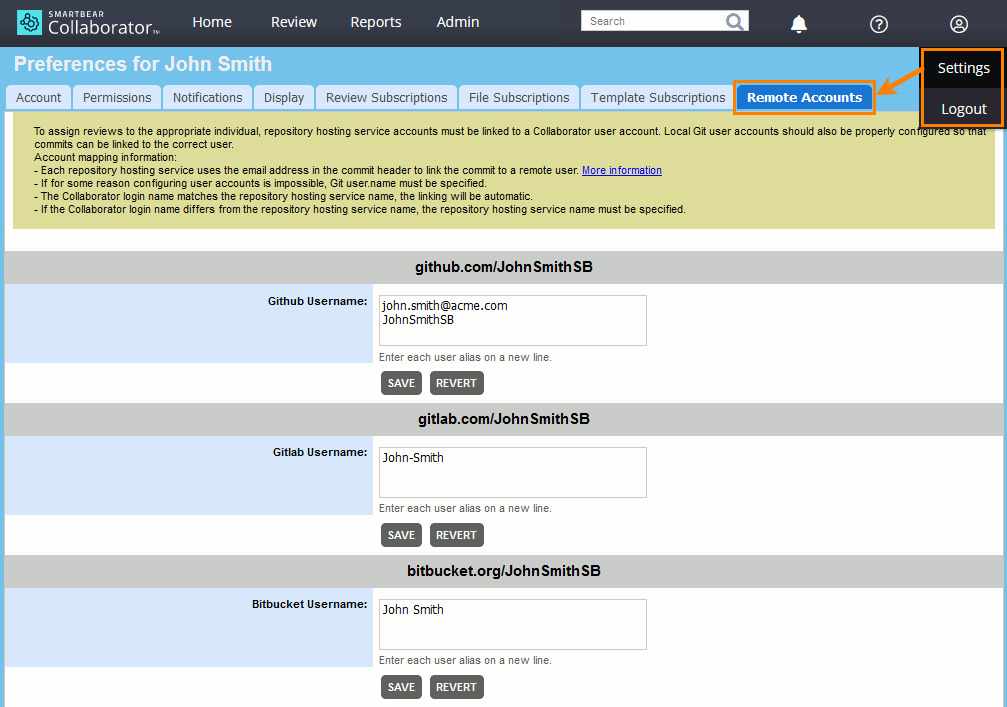 |
| 2. | Specify your account names for those web-based repositories, on which you have accounts. To specify several names or e-mails, separate them by comma. For Bitbucket users: enter your Bitbucket name exactly as it is specified in the Name field of the Bitbucket settings. For GitLab users: enter your GitLab name exactly as it is specified in the Full Name field of the Profile settings. Linking user by email address works when email address is specified as Public email in the Profile settings. Press Save to apply the changes. |