This topic explains how to upgrade from a previous version of Collaborator server and retain all your data and settings.
For major releases, we recommend that you install the new version on a test machine using a copy of your current database. Test a typical workflow on the system to make sure it works and that there are no surprises for your users. See Testing Newer Versions for details.
Back Up Before Upgrading
During the upgrade process, changes may be made to Collaborator's database schema. Thus the upgraded server's database may become incompatible with previous versions of Collaborator. Therefore, it is important to perform a complete backup before attempting an upgrade.
Creating a backup is especially important if you are upgrading from an outdated version of Collaborator, CodeCollaborator or PeerReview Complete. Collaborator merges and replaces both CodeCollaborator and PeerReview Complete.
How to Upgrade
Upgrading the server component works exactly like installing it. To keep your data and configuration, do not uninstall previous version of Collaborator server. Just install a new version over the existing version.
Download the server installer(s) and proceed through the installation wizard. If the installer detects an existing Collaborator server, it automatically assigns the same setting values as in the current configuration - though they can be edited, if desired.
During server upgrade, the installation wizard verifies Java Database Connectivity (JDBC) drivers your server uses to connect to MySQL, SQL Server or Oracle databases. If these are legacy JDBC drivers, the wizard removes them. In this case you may need to download and install new drivers as described in Database Installation sections.
Once the installation is finished, an update of database schema could be required. In this case, on attempt to open a Collaborator Web Client, it will display the database update form:
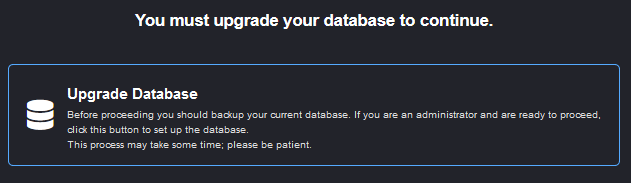
Ensure that you have made a backup and press Upgrade Database button to proceed with the database migration. The rest of schema upgrade process is automatic. This may take some time depending on the scale of the changes required, so please be patient.
Compatibility with Older Clients
Collaborator server is backward compatible with a certain number of earlier versions of Collaborator clients.
Currently, Collaborator 11.x and earlier clients are incompatible with Collaborator server 12.0 and later. To work with it, you will need to upgrade your clients to version 12.0 or later.
You can find the number of the oldest stable client application, as well as specify your own minimum allowable build number in the Administrator Settings. Client applications whose build number is lower than Minimum Client Build are incompatible with the current version of Collaborator server.
In order to use new features of Collaborator, we recommend that you upgrade Collaborator clients, as well.
Upgrade Notes
| • | Windows-Only: The system will be taken off-line while the upgrade takes place and will start automatically after the upgrade completes. When upgrading using a 64 bit installer on a server installed using the 32 bit installer, be sure to verify the install directory is the same as you currently have. The 64 bit installer will NOT automatically detect the existing install directory of a Collaborator install that was done using the 32 bit installer. In this scenario, simply edit the install location to be the fully qualified path of the existing install directory. |
| • | Unix-Only: The installer will not automatically stop or start the server, so if the server is currently running you will need to manually stop it, perform the upgrade, and then restart it. |
| • | After the upgrade validate the configuration of your Java Database Connectivity (JDBC) drivers. Upgrading an outdated server may remove legacy JDBC drivers. |
| • | Servers with active SSO: To avoid problem with configuration data corruption it's recommended to disable SSO before the database upgrade (use -Dcom.smartbear.server.sso.disable=true Java VM option.) and re-enable authentication after the upgrade. Another possible workaround: 1. Disable SSO after the upgrade anyway. 2. Open the active SSO configuration and click the SAVE button to update the corrupted data. 3. Restart the server enabling SSO. |