Log Files
Collaborator server logs messages to several files.
Log File |
Description |
<Collaborator Server>/tomcat/logs/collab.log |
Captures application level logging and (if enabled) license usage events, such as user login and logout. Configurable. |
<Collaborator Server>/tomcat/logs/audit.log |
Captures actions of administrators and group administrators, such as modifying server settings, templates, groups, user properties and so on. Configurable. |
<Collaborator Server>/tomcat/logs/license.log |
Captures actions of log license events (users logging in and out). Configurable. |
<Collaborator Server>/tomcat/logs/cache.log |
Captures L2 cache usage statistics. Configurable. |
<Collaborator Server>/tomcat/logs/documentConversion.log |
Captures document conversion actions. Configurable. |
<Collaborator Server>/tomcat/logs/remoteSystem.log |
Captures actions of remote repository integrations. Configurable. |
<Collaborator Server>/tomcat/logs/remoteSystemAPI.log |
Captures all outgoing API calls and usage statistics of API cache. Configurable. |
<Collaborator Server>/output.log |
Captures the standard out stream from the application libraries. Non-configurable. |
<Collaborator Server>/error.log |
Captures the standard error stream from the application libraries. Non-configurable. |
Note: Normally, Collaborator does not write to standard out or error, but some of the libraries that it uses do. Occasionally, output.log and error.log could be helpful for debugging issues in one of those libraries.
Configuring Logging Using Configuration Files
Collaborator uses reliable and flexible logging framework, Logback, to manage the logging. Because of the breadth of configuration options available in Logback, it is not possible to document everything here (the Logback documentation is available at https://logback.qos.ch/manual/index.html). However, in this section, we will cover some common scenarios.
The configuration file for the collab.log, audit.log, cache.log, documentConversion.log, remoteSystemAPI.log and remoteSystemAPI.log files can be found at <Collaborator Server>/tomcat/webapps/ROOT/WEB-INF/classes/logback.xml. The file is in XML format and can be edited with any text editor.
By default, changes to logging configuration will be applied within 30 seconds after saving the logback.xml file. Restarting server is not required.
Note: Changes applied to the logback.xml file will not be saved between updates to Collaborator. Upon editing this file, it is a good idea to save a backup of the file in a location outside the Collaborator installation tree.
Basic Debug Logging
The most common configuration change that system administrators will make is to turn on debug logging. This can be useful when working with SmartBear technical support to resolve issues (though this is not always required).
To enable debug logging:
| 1. | Open the <Collaborator Server>/tomcat/webapps/ROOT/WEB-INF/classes/logback.xml file. |
| 2. | Locate the root element and change the logging level from "info" to "debug": |
<root level="debug" additivity="false">
<appender-ref ref="CodeCollaborator" />
</root>
| 3. | Save the file to apply changes. |
Do not change the name of the appender as this will result in the log configuration not being available via JMX. Running a production system at debug logging level can cause performance issues, so it is not recommended unless specifically directed by SmartBear technical support.
Log Rolling
By default the log files are rolled when they reach 10MB and the system keeps 10 backup copies of each log file. Both of these values can be configured in the log configuration file. The following lines specify these values for collab.log:
<rollingPolicy class="ch.qos.logback.core.rolling.FixedWindowRollingPolicy">
<fileNamePattern>${catalina.home}/logs/collab.log.%i</fileNamePattern>
<minIndex>1</minIndex>
<maxIndex>10</maxIndex>
</rollingPolicy>
<triggeringPolicy class="ch.qos.logback.core.rolling.SizeBasedTriggeringPolicy">
<maxFileSize>10MB</maxFileSize>
</triggeringPolicy>
System administrators may change these values as necessary to capture additional logging information or conserve disk space as necessary.
Collaborator can log license events (users logging in and out) to help you understand your license consumption. By default this is disabled as it is normally not necessary. The system status page includes graphs which are helpful for understanding the total license consumption. However, drilling down to find what users are using the system when requires turning on license logging.
To enable license logging:
| 1. | Open the <Collaborator Server>/tomcat/webapps/ROOT/WEB-INF/classes/logback.xml file. |
| 2. | Locate the logger name="com.smartbear.ccollab.license" element and change the logging level from "warn" to "debug": |
<logger name="com.smartbear.ccollab.license" level="debug" additivity="false">
<appender-ref ref="CodeCollaboratorLicense" />
</logger>
| 3. | Save the file to apply changes. |
The license log appender is also configured to roll like the collab.log and this configuration can be changed in a similar manner. However, it is important that you not change the appender name from "CodeCollaboratorLicense" as this will result in the log configuration not being available via JMX.
Enabling Remote System Logging
To diagnose issues with repository hosting integrations, you may enable detailed logging of remote repository actions and/or logging of outgoing API calls and usage statistics of API cache. By default those are disabled as it is normally not necessary.
To enable detailed logging of remote repository actions:
| 1. | Open the Collaborator login page in a browser and log in to Collaborator as an administrator. |
| 2. | In Collaborator, go to Admin > Integrations |
| 3. | Set the Enable detailed logging option to Yes. |
| 4. | Click Save. |
To enable logging of outgoing API calls and usage statistics of API cache:
| 1. | Open the <Collaborator Server>/tomcat/webapps/ROOT/WEB-INF/classes/logback.xml file. |
| 2. | Locate the logger name="rsApiLog" element and change the logging level from "warn" to "debug": |
<logger name="rsApiLog" level="debug" additivity="false">
<appender-ref ref="RemoteSystemAPI" />
</logger>
| 3. | Save the file to apply changes. |
If the Collaborator server has JMX management enabled, the logging level can be changed at runtime. All of the log configuration MBeans are available at com.smartbear.ccollab:/:Logging. Changing the "priority" on "Application Logger" or "License Logger" will change the base level of logging for the application and the license log respectively.
The appenders are found under the names "Application Log" and "License Log". The max size, number of backups, and even the file names, can be changed in JMX. The changes will not take effect until the "activateOptions" operation is invoked. In jconsole operations are found in a separate tab.
Note: Changes to logging made via JMX are not persisted across server restarts.
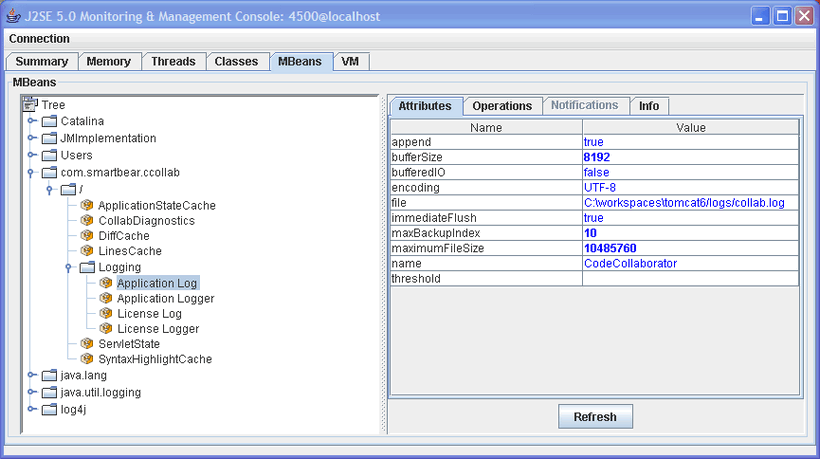
Editing the Application Log Configuration in jconsole