The Collaborator server can be configured to communicate directly with a Git repository. This allows users to review commits completely from the browser, without having to install any client programs. To enable this feature, first install and configure a Git client on the Collaborator server and then create an entry for your Git repository in the Version Control tab of the administration interface. Version control server entries are also created automatically if one of the client programs uploads files from a repository that does not match any of the currently configured servers.
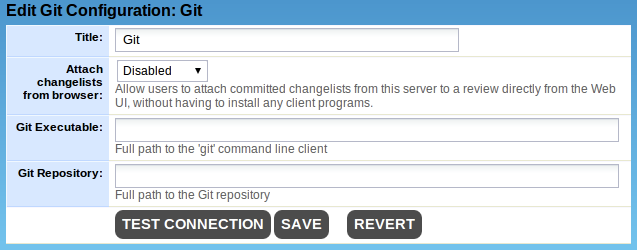
The title is displayed to users, so it should be something that everyone will understand, even if they are going through proxies, VPNs, or other such things. When a version control server entry is created automatically, this is filled in with "Git". |
|
If enabled, this feature lets users select commits to review directly from the web browser, without having to install any client programs. |
|
Full path to the 'git' command line client |
|
Full path to a Git repository. This is only necessary if you enable "Attach changelists from browser". The repository can be "bare". |
Click the Test Connection to make sure Collaborator can contact your Git repository.
You can supply Java-style regular expressions to map changelists from this Git repository uploaded from our client tools. It is important to set up these regular expressions so that files uploaded by the various Collaborator client tools are correctly associated with this server-side Git configuration.
