The Collaborator Eclipse Plug-in integrates with the Subclipse and Subversive Subversion Plug-ins. Currently, Collaborator Eclipse Plug-in supports Subclipse versions 1.4.x - 1.6.x and Subversive 4.x (SVN Connector 6.x).
Adding Subversion files to a Review
Files managed by Subversion can be uploaded to the Collaborator Server by Adding Files to a Review.
Adding Subversion files to a Review from the Synchronize View
Files managed by Subversion can also be added to a review from the Synchronize view. Right-click on any projects, folders, or files in the Synchronize view and select Add to Review.
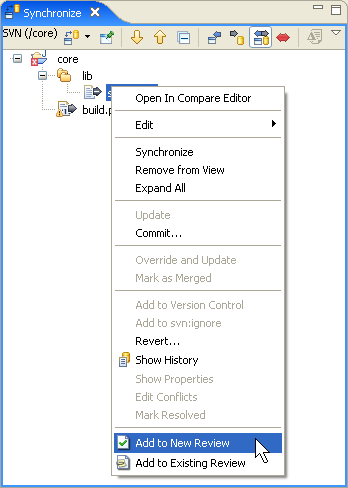
The Add to Review Wizard will launch with the selected files.
Adding a Subversion Revision to a Review
Revisions are shown in the History view. Right-click on a Revision and select Add to Review.
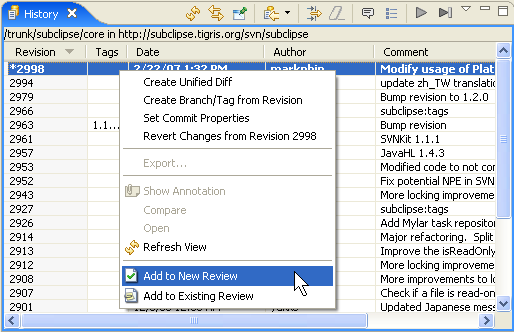
Clicking Add to Review will launch the Add to Review Wizard. The wizard will include a page that shows the Revision you selected:
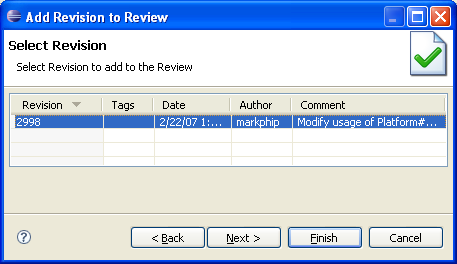
The Revision you selected specifically will appear here. You may select more or fewer Revisions than you originally selected.
Finishing the Add to Review Wizard will upload the Revision to the Collaborator Server.