The Collaborator Eclipse Plug-in integrates with the Perforce using the Eclipse (P4Eclipse) Plug-in from https://www.perforce.com/plugins-integrations/eclipse-plugin.
Adding a Pending Changelist to a Review
Right-click on one or more Pending Changelists in the P4 Pending Changelists view and select Add to New Review or Add to Existing Review.
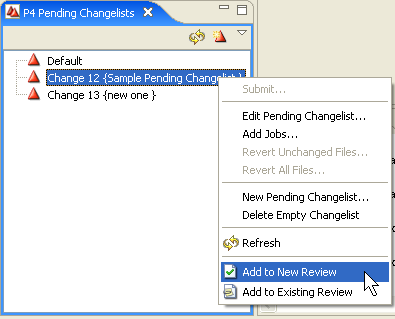
Clicking one of the Add to Review items will launch the Add to Review Wizard. The wizard will include a page that shows the Pending Changelists you selected, allowing you to select exactly which ones you want to upload:
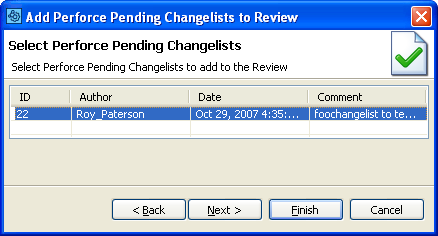
Any Pending Changelists you selected specifically will appear here. You may select more or fewer Pending Changelists than you originally selected.
Finishing the Add to Review Wizard will upload your Pending Changelists to the Collaborator Server.
Adding Submitted Changelists to a Review
Right-click on one or more Submitted Changelists in the P4 Submitted Changelists view and select Add to New Review or Add to Existing Review.
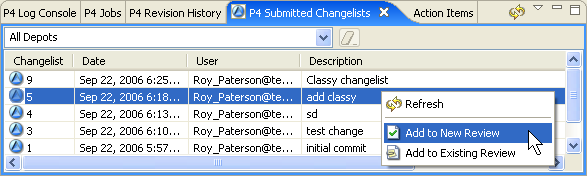
Clicking one of the Add to Review items will launch the Add to Review Wizard. The wizard will include a page that shows the Submitted Changelists you selected, allowing you to select exactly which ones you want to upload:
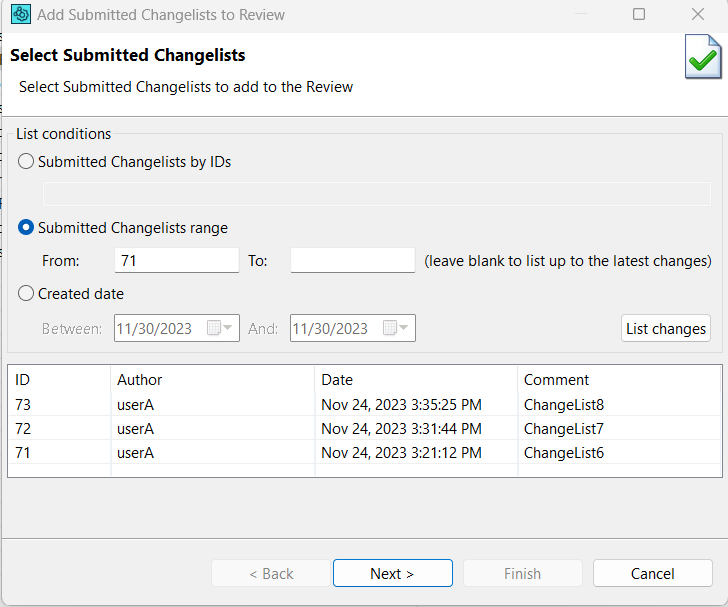
Any Submitted Changelists you selected specifically will appear here. You may select more or fewer Submitted Changelists than you originally selected.
Finishing the Add to Review Wizard will upload the Submitted Changelists to the Collaborator Server.