The Collaborator Add-On for DOORS makes it easy to create or update DOORS requirement documents reviews with just a few clicks. When using the Add-On, there is no need to export and upload the files manually to Collaborator - you can upload requirements directly from DOORS Classic.
Technical details and limitations
| • | The Collaborator Add-On for DOORS is supported for DOORS Classic started from version 9.3 installed on Windows. |
| • | The Collaborator Add-On for DOORS works with Collaborator starting from version 14.0.14000 |
Get Started
| 2. | Launch DOORS Classic. |
| 3. | Specify Collaborator server and user credentials in Add-On preferences. |
How the Integration Works
| 1. | Open the desired requirement module in DOORS Classic. |
| 2. | Switch to the User menu and click Collaborator Reviewer. This will launch the DOORS Add-On. |
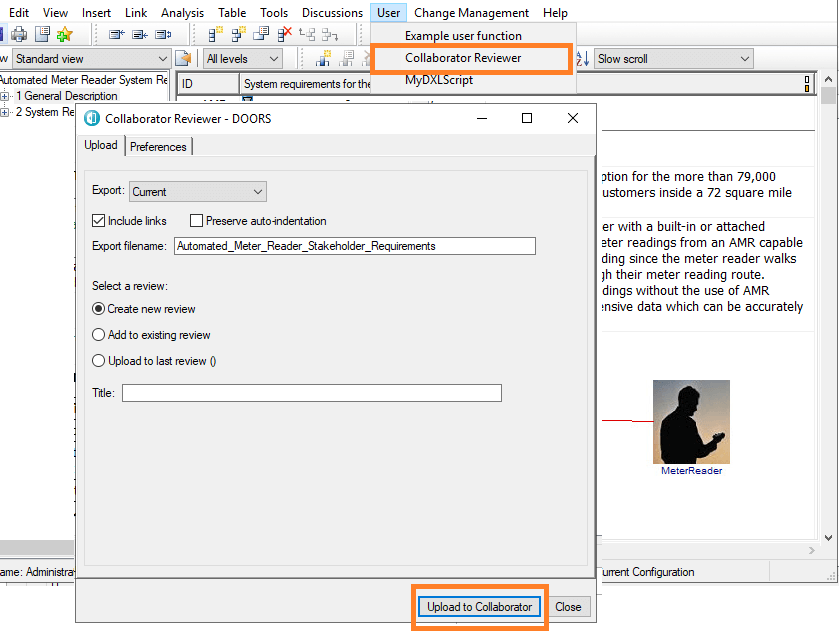
| 3. | In the subsequent dialog, switch to the Upload tab and select the options that you want to apply to the export. |
| 4. | Specify whether to upload requirement documents to the last review that was created with Collaborator Add-On for DOORS, to create a new review or to upload it to some existing review. |
Export |
Two options available for exporting: the current module only (Current) or with all the modules that have links to or from it (All Linked). The HTML includes pictures, and pictures of any OLE objects in the modules. |
Include links |
Enable exporting information about links. |
Preserve auto-indentation |
Once enabled auto-indentation in the view, then the Preserve auto-indentation field is displayed. If you do not want the generated HTML to be indented, clear this option. |
Export filename |
Defines name of current DOORS module in the Collaborator review. Default value is module filename. |
Select review |
There are three variants to upload requirement documents to the review: Create new review. Once this option is chosen review title appears and can be defined. In case field left empty default Collaborator review name will be used. Add to existing review. Once this option is chosen list of existing reviews appears. Upload to last review. Once this option is chosen id of the last review created from this plugin will be displayed. |
5. Click Upload to Collaborator.
6. After exporting module success popup appears. Link to the Collaborator review is copied to the clipboard automatically.
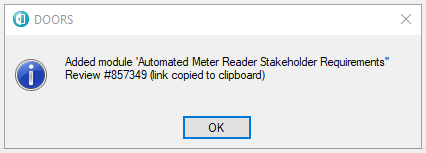
After clicking on OK button DOORS Add-On will close, so cannot be re-used for another upload.