Before using the Collaborator Add-On for DOORS, you must specify Collaborator server and user credentials.
Settings
To change the Add-On settings:
| 1. | Open DOORS Classic. |
| 2. | Switch to the User tab and click Collaborator Reviewer. This will launch the DOORS Add-On. |
| 3. | Switch to the Preferences tab. |
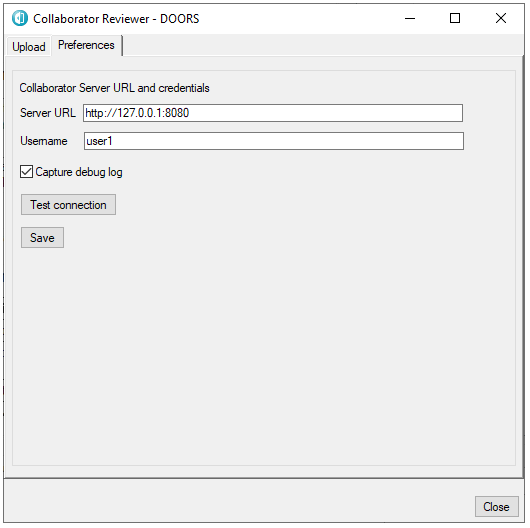
Collaborator Add-On options
The Collaborator Add-On for DOORS have the following settings:
Server URL |
Denotes which Collaborator server to use. The Server URL must include the correct port number and path if applicable. If your server uses HTTPS, you may need to install its certificate as described earlier. |
Username |
Specifies user credentials. The user name and password are the same as you use when logging into the web server (the password or login ticket is requested when you log in for the first time). You can specify your password or login ticket. When single sign-on authentication is disabled, specify password. When single sign-on authentication is enabled, specify login ticket instead. |
Capture debug log |
Once enabled, the Collaborator Add-On for DOORS will gather debug information and store it at USERDIR/.smartbear/logs/doors.log Here USERDIR refers to the user's home directory (under Windows, your "Documents and Settings" Profile directory). |
Test connection |
Check connection to the Collaborator server without saving username and password. To store credentials for further actions press Save button. |