The Conversations View displays conversations on the most recently focused Review Editor or Compare Editor. For the Review Editor the Conversations View shows the overall Review conversation. For the Compare Editor the Conversations View shows all the conversations on the file.
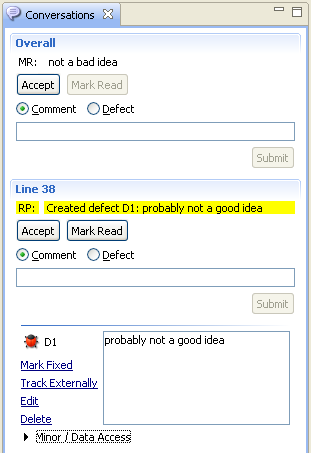
Unread Comments are highlighted with a yellow background. You can mark conversations Accepted or Read. You can add Comments. You can create or modify Defects. You can start a conversation at a new location or add to an existing one.
Right-click on a Comment and select Redact to redact it. Redacted comments are grayed-out.
Known Issue
Conversations View in Eclipse Oxygen does not split long line of text into multiple lines, because of this a horizontal scroll bar can appear if your conversation of checklist item contains long text.