This section covers the Collaborator database schema and some special features of the database we created specifically to support external custom reporting applications.
The Database is Read-Only!
Never change data in the database directly. Although we support read-only access to the database for reporting and automation, if you make changes to data in the database yourself you could irreparably destroy the integrity of the database.
Database Schema
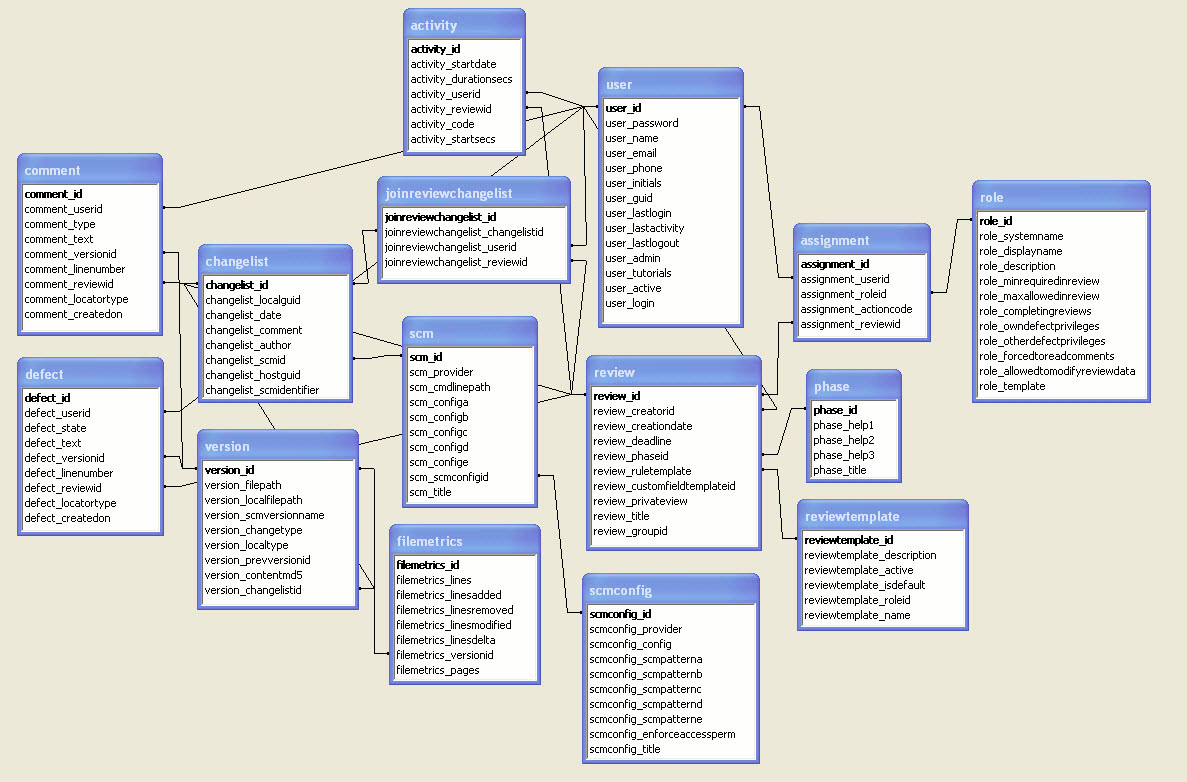
The diagram below shows only the major tables in the Collaborator database and which files should be linked with which other fields when creating queries.
There are more tables which are either (a) purposefully undocumented or (b) described below but which do not have relationships to other tables. The diagram does not contain those tables in the interest of simplicity:
 |
| Click to Zoom |
Warning: SmartBear reserves the right to change any of the table definitions whenever there is a minor point-release of the product.
Note: The table/view names above are approximations. In some cases, the names may be altered slightly (for example, vowels are removed).
We are committed to backwards-compatibility with the reporting views, and with our own client software.
Here is a brief description of each table:
activity |
Activity log of users' actions during review. This is used to compute metrics such as inspection rate. Each row represents a slice of time where the user was active. There might be many slices for a given user in a single review. Each slice includes a duration (in seconds) and a "start time" that is encoded both as a database date/time (activity_startdate) and as a number of seconds since 1970-01-01 00:00:00 GMT (activity_startsecs). The activity action code (activity_code) tells whether the user was acting in the capacity of an author (A), reviewer (R), or was doing rework (F) as opposed to actually reviewing. Also there is a code for when someone views the review but is not a participant (P). It almost always best to use the reporting views to access activity data so you do not get your query wrong. The technique and motivation behind this system is described in our metrics section. |
assignment |
List of user <--> review combinations. For each user who was "assigned" to a review, notes the role associated with that user. The assignment_actioncode field is used internally to understand what general status that user has in the review currently. You should not depend on this field as we might change it in the future. Refer to the assignment_state view for names and descriptions for these codes. |
changelist |
Every time a set of files is uploaded to the server a "changelist" record is created. Most changelists will be associated with a review through joinreviewchangelist, but some may not be for various reasons. Changelists are linked to version where the actual file content is represented. If the changelist is of files from a local hard drive, the "local GUID" field will contain a globally-unique made-up identifier for that upload. If the changelist was derived from something already checked into version control (for example, a Perforce or Subversion changelist), then this field will be blank. The date, author, and check-in comment are all listed if known. To the extent possible this will match usernames with version control. Also linked is the SCM table ID. This ties the changelist to a specific version control server. Changelists from different servers might match in other details but are actually unrelated. If the changelist happened to have an associated identifier in a version control system, that is also recorded. Otherwise that field is blank. |
comment |
Represents a comment made by a user in some conversation. This includes not only actual chat but indirect events such as "marked read" and "created defect" and "new file uploaded". Also included is the file (version) and line number the comment is associated with, however both of those fields are optional. They are linked to user ID and review ID as well. |
defect |
Represents a defect made by a user in some conversation. Also included is the file (version) and line number the defect is associated with, however both of those fields are optional. They are linked to user ID and review ID as well. A state field indicates whether the defect is still open or fixed. We will be adding more state to this field in the future. |
filemetrics |
Holds basic change metrics for file versions. Each filemetrics record is tied to one version record. You should only depend on the values of this table for versions directly associated with changelists. The other metrics are often incomplete. There are technical reasons for this; we will not be changing this behavior. |
groupdescription
|
Represents a group. Some of the groups are defined in the web UI and some are built-in internal groups automatically defined by Collaborator |
groupusers |
Joins the groupdescription table with the user table to represent the users that are direct members of a group. A user can be a member of zero, one, or many groups. |
groupgroups |
Joins the groupdescription table with itself to represent the groups that are direct members of a group. A group can be a member of zero, one, or many groups. |
groupancestry |
The behavior of this table is intentionally undocumented. |
joinreviewchangelist |
Joins reviews and changelists. A changelist can be associated with zero, one, or many reviews, and a review can be associated with zero, one, or many changelists. |
metadatadescription metadatavaluecharacter metadatavaluedate metadatavalueinteger metadatavaluestring metadatavaluestringbig |
All of these tables have to do with "meta-data" which means any data where the data schema itself is dynamic. Most notably, all review and defect custom fields are a kind of meta-data. You should not use the meta-data tables directly. Their relationships are very complex and we change how they work regularly as we add more features. Instead, access meta-data through the reporting views described below. This contains all the information you need for custom fields and formats it nicely as an added bonus. |
metadataselectitem |
Information for all the drop-down items in any custom field. Each item is matched to a particular custom field. The "title" is the text displayed to end users. A "sequence" number defines the order of the elements (the IDs are not an order). Items can also be individually enabled or disabled. |
notification |
Holds the history of notification messages that have been sent out to clients. Clients might choose (or not) to get notifications by email, RSS feed, and so on. This table is periodically cleaned out by the server. There will always be some backlog of events for each user (for example, for use in creating the RSS feed for a user), but you cannot depend on any particular number of events to be saved. |
reportcategory reportfilter reporttemplate |
Internal server use. Do not depend on this table. |
review |
Holds one record for each review in the system. The "creator" is the user who created the review, or the system administrator if the review was created automatically. Use the review custom field view to access review custom field data. |
reviewtemplate |
Internal server use. Do not depend on this table. |
role |
Represents all of the roles from all role-sets. Each role has a "standard" name that never changes and the custom name that was set by the user. |
scm |
Contains one record for each SCM server that has ever been reported by a client. It is OK if there are duplicate records for a given SCM system. This separates changelists from different systems. This table will probably change in the future. |
user |
One record for each user who can log into the system. User ID 1 is the special system administrator. Key user information and preferences are stored here. Additional user preference information is stored as meta-data and is accessible from the special userprefs view. The user_initials field is deprecated and should be ignored. Passwords are stored in hashed form so that a casual observer cannot deduce a password. If you need to reset a password, set this field to: d41d8cd98f00b204e9800998ecf8427e |
version |
One record for every version of every file that has ever been uploaded to the server. Join with changelist to see the group they were uploaded with. Each version includes the full file path to the original document. If this file was retrieved from version control, this will be the version control server path, not the path on the user's local hard drive. The version name is the version control-specific name of the version of the file. This is typically a number or set of numbers. The version change-type indicates whether this represents a file addition, deletion, modification, and so on. Sometimes the system does not know. You should use this as a guide but not depend on it because there are exceptions to the "type" rules and we add new types periodically. The current values are: ? - Unknown A - Added B - Branched D - Deleted I - Integrated M - Modified R - Reverted U - Uploaded
Sometimes the version will have a "previous" version. This typically means the version that came before it in version control. This is used internally and is tricky; there are lots of exceptions and we can change exactly what this means. The content MD5 is the MD5 sum of the raw content of the file. This can be used to link a version with the on-disk file content stored in the content cache. It can also be used as a check to see whether two versions are identical. |
For databases that support the concept of a "View," Collaborator creates a set of Views specifically for the purpose of external report-writers. You should use these Views whenever possible; we will make sure that the definitions of these Views remain the same even if we change the database schema in future versions.
You can also use these Views as a guide for how to create other custom queries.
Here are the special reporting Views:
assignment_view |
Contains columns from the assignment table which will be maintained in the event of a future schema change. |
||||||||||||
assignment_state |
Contains names and descriptions for the codes used in the actioncode column of the assignment table. |
||||||||||||
defects_by_path |
One row per review reporting file path, lines of code reviewed, and number of defects. |
||||||||||||
defectcustom |
These are the custom fields you have defined for defects, one row for each defect. If you change the custom field definition, the layout of this table will change as well (automatically, and immediately). Warning: Because the exact custom field titles are used for column names, if you change the title of a custom field it will change the definition of this view. With review workflows, each review might have a different subset of custom fields. In this case fields are NULL when they are not applicable. |
||||||||||||
defectcustom_compat |
Same as defectcustom, but column names are in the form custom_id_N where "N" is the custom field ID as displayed in the custom fields admin page. The columns are ordered exactly the same as defectcustom, so you can also tell which is which by comparing the two views. |
||||||||||||
defect_custom_dropdowns |
This table contains a list of the possible values as defined in drop-down and multi-select Defect Custom Fields. |
||||||||||||
defect_state |
Contains "defect state" codes and names. Join on this table if you would like to display more user-friendly defect state names. |
||||||||||||
defect_view |
Contains columns from the defect table which will be maintained in the event of a future schema change. |
||||||||||||
participant_singleline_values |
Shows Participant Custom Field values that users have selected in reviews. This table only shows values for "Single-Line Text" type custom fields. A NULL value means that a custom field was defined for a review's template, but the user did not specify a value. |
||||||||||||
participant_multiline_values |
Shows Participant Custom Field values that users have selected in reviews. This table only shows values for "Multi-Line Text" type custom fields. A NULL value means that a custom field was defined for a review's template, but the user did not specify a value. |
||||||||||||
participant_select_values |
Shows Participant Custom Field values that users have selected in reviews. This table shows values for "Drop-Down" and "Multi-Select" type custom fields. A NULL value means that a custom field was defined for a review's template, but the user did not specify a value. In the case of Multi-Select fields, if a user selected multiple values then multiple rows will appear in the results, one for each selection. |
||||||||||||
phase |
Represents the various phases a review can be in. |
||||||||||||
review_activity |
For each unique combination of review, user, and role, reports the person-hours spent. This includes data for current review participants only. If a user was a participant but is not now, that person will not be included in this result. However that time will be included in the review_activity_summary view. |
||||||||||||
review_activity_summary |
One row per review reporting author, reviewer, rework hours, and total person-hours spent in the review.
|
||||||||||||
review_comment_summary |
One row per review reporting author, reviewer, and total number of comments made in the review. |
||||||||||||
review_defect_summary |
One row per review reporting the number of defects created in that review. |
||||||||||||
review_metrics_summary |
One row per review reporting a variety of standard metrics such as inspection rate, defect rate, defect density, and the individual numbers used to form those ratios. Some values will contain NULL values because of divide-by-zero errors. |
||||||||||||
review_version_list |
Lists all versions actually associated with a review, although with the associated review. |
||||||||||||
review_version_summary |
One row per review reporting the number of files and line metrics (total, added, modified, removed) for all files in the review. |
||||||||||||
reviewcustom |
These are the custom fields you have defined for reviews, one row for each review. If you change the custom field definition, the layout of this table will change as well (automatically, and immediately). With review workflows, each review might have a different subset of custom fields. In this case fields are NULL when they are not applicable. |
||||||||||||
reviewcustom_compat |
Same as reviewcustom, but column names are in the form custom_id_N where "N" is the custom field ID as displayed in the custom fields admin page. The columns are ordered exactly the same as reviewcustom, so you can also tell which is which by comparing the two views. |
||||||||||||
review_custom_dropdowns |
This table contains a list of the possible values as defined in drop-down and multi-select Review Custom Fields. |
||||||||||||
review_view |
Contains columns from the review table which will be maintained in the event of a future schema change. |
||||||||||||
role_view |
Contains columns from the role table which will be maintained in the event of a future schema change. |
||||||||||||
userprefs |
Additional user preferences, one row per user. Most user information and preferences are stored in the user table; the rest is here. |
||||||||||||
userprefs_compat |
Same as userprefs, but column names are in the form custom_id_N where "N" is an internal ID used to store user preferences. The columns are ordered exactly the same as userprefs, so you can tell which is which by comparing the two views. |
||||||||||||
user_view |
Contains columns from the user table which will be maintained in the event of a future schema change. |