Review Pools allow an Author to select a Group as a participant, for a given Role, in a review. Groups which have been configured for use as Review Pools will be displayed in the New Participant dropdown on the Review Summary page.
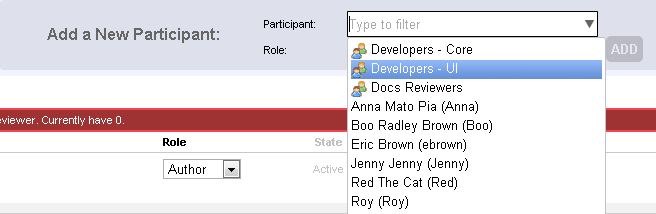
Any number of Review Pool selections can be made, each designating a Role of the participants from each group. Selections can be made only during the Planning and Annotating phases. When Planning is complete, the Author moves the review to the Annotating phase to notify Review Pool participants there is a Review for which they may designate themselves as the participant. All members of the selected Review Pool group will receive notifications that they are invited to participant. Email notifications are sent, if configured. Note that Begin Review will also start the Annotating phase if there are pending Review Pool assignments.
Taking a Review Pool Selection
For each Review Pool assignment, the Participants section of the Review Summary page displays a Take button, which is enabled for eligible participants (members of the Review Pool group). The first eligible participant to go the the Review Summary page and select the Take button becomes a participant with the given Role in the Review.
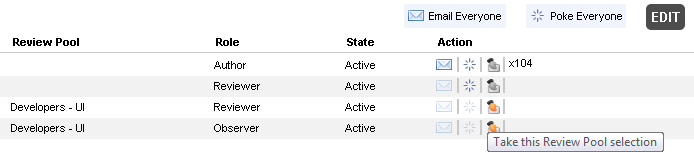
The Review remains in Annotating until all pending Review Pool assignments are taken - the Inspection is not allowed to begin until then.
A review in the Annotating phase with pending Review Pool assignments will automatically begin the Inspection phase once the last review pool selection is made, as long as other participant constraints have been met.
Configuring For Review Pools
In order to enable Review Pools, a Collaborator Administrator will need to configure Groups to be used for Review Pools.
Review Pool Subscriptions
Administrators can also set-up review pool subscriptions. Once a review of particular author is created, or a review contains some particular files, or a review uses some particular template, Collaborator will automatically add a group to this review. At that the number of review participants to be added and their roles are fully configurable for each group.