|
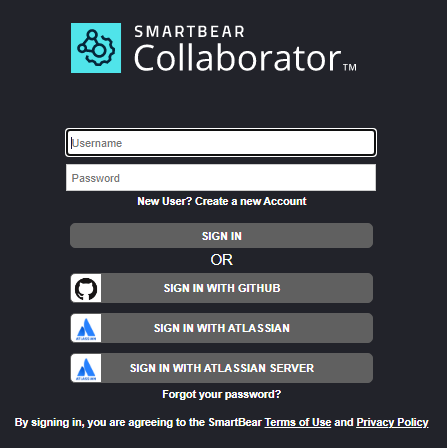
Administrators can complement Collaborator's generic authentication with user authentication via third-party services (for example, GitHub or Atlassian). In this case the Collaborator's login page will display additional login options, so that users can specify their third-party account and log into Collaborator.
General concept
The authentication process will consist of the following steps:
| 1. | A user tries to access a Collaborator server. |
| 2. | Collaborator recognizes that the user is not logged-in and displays the login page with additional login options. |
| 3. | User selects the desired third-party service and specifies their credentials on that service. |
| 4. | The third-party service authenticates the user and redirects back to the Collaborator server. |
| 5. | Collaborator server logs the user in. |
| 6. | If a user with the specified credentials is not found, Collaborator creates a new user. |
The logout process will consist of the following steps:
| 1. | A user tries to logout from the Collaborator server. |
| 2. | Collaborator sends logout request to the third-party service. (For Github only) |
| 3. | The third-party service logs the user out and sends the response back to the Collaborator server. (For Github only) |
| 4. | Collaborator logs the user out. |
Authentication via third-party services in Collaborator
Collaborator supports third-party authentication for web client only. For other clients, you should specify your regular Collaborator credentials.
Currently, authentication via the following third-party accounts is supported:
|