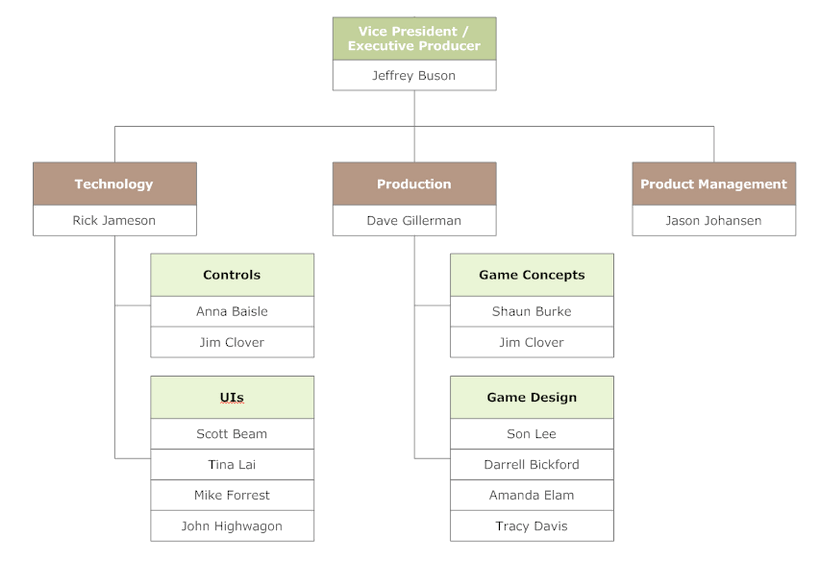
The Groups feature is flexible enough to allow you to model any organization. As an example, suppose your company's Action Games Division org chart looked like this:
Companies this large typically store their org chart in an LDAP system. The Collaborator administrator can write a script that synchronizes Collaborator groups with the LDAP system.
For example, the XML to create the organizational structure shown above would look like this:
 | Sample XML <groups> − <group guid="action-games-division" title="Action Games Division" allow-associate-with-reviews="false"> <member-group guid="technology"/> <member-group guid="production"/> <member-group guid="product-management"/> <member-user login="jbuson"/> </group> − <group guid="technology" title="Technology" allow-associate-with-reviews="false"> <member-group guid="controls"/> <member-group guid="uis"/> <member-user login="rjameson"/> </group> − <group guid="production" title="Production" allow-associate-with-reviews="false"> <member-group guid="game-concepts"/> <member-group guid="game-design"/> <member-user login="dgillerman"/> </group> − <group guid="product-management" title="Product Management" allow-associate-with-reviews="false"> <member-user login="jjohansen"/> </group> − <group guid="controls" title="Controls" allow-associate-with-reviews="false"> <member-user login="abaisle"/> <member-user login="jclover"/> </group> − <group guid="uis" title="UIs" allow-associate-with-reviews="false"> <member-user login="sbeam"/> <member-user login="tlai"/> <member-user login="mforrest"/> <member-user login="jhighwagon"/> </group> − <group guid="game-concepts" title="Game Concepts" allow-associate-with-reviews="false"> <member-user login="sburke"/> <member-user login="jclover"/> </group> − <group guid="game-design" title="Game Design" allow-associate-with-reviews="false"> <member-user login="slee"/> <member-user login="dbickford"/> <member-user login="aelam"/> <member-user login="tdavis"/> </group> </groups> |
Note - we have assumed that user's logins are created by prefixing the first character from their first names to their last names. All of the groups have "Allow associate with Review" set to "No".
Reporting based on group membership
The reporting system can be used to create reports based on group membership. For example, all reviews where a member of a department was a participant, or all reviews created by a member of a department, and so on.